Evidence Summary
- Workflow run
crm-communication-add-contact-20260519T110037Z- Communication
39- Selected contact
1240/comercial@guisoft.net- Added list row
1171- Add request
communications/postAddLCommunications
Before You Start
- Open CRM then Operations then Comunications, or navigate to
/crm/communications. - Open the communication detail page. The verified route was
/crm/communications/view/Mzk=, whereMzk=is the encoded id for communication39. - This workflow only adds contacts to the communication list. It does not send, send a test email, schedule, duplicate, upload documents, or touch stock.
Use the Add Contacts Modal
- Click Add Contacts on the communication detail action bar.
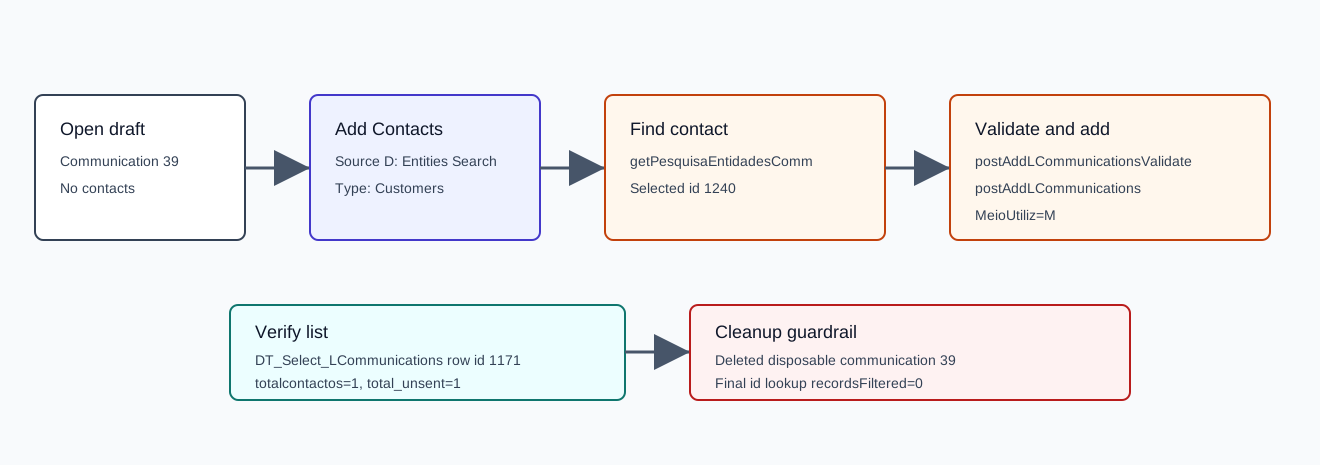
- Choose a source in 1) Source. The verified run used Entities Search, which submitted
TipoOrigemEnt=D. - Choose one or more third-party types in 2) Select Type of Third. The verified run selected Customers, which submitted
selectTipoT=C. - Optionally fill filters such as Classification, Name, Address, Zip Code, Location, Country, Activity sector, or Bypass GDPR authorization.
- Click Search, select the intended result rows, then click Add Contacts.
The modal also exposed Based in Research Segment, Leads, and Import sources. The segment source is verified in How to Add Segment Contacts to a CRM Communication; the CSV import source is verified in How to Add CSV Contacts to a CRM Communication; and the lead-list source is verified in How to Add CRM Lead Rows to a Communication.
Verified Requests
| Step | Request | Verified detail |
|---|---|---|
| Search contacts | GET /ajaxserver | action=communications, option=getPesquisaEntidadesComm, TipoOrigemEnt=D, selectTipoT=C, email=1, meioutiliz=M. The verified search returned customer email rows and selected contact 1240. |
| Validate selection | POST /ajaxserver | option=postAddLCommunicationsValidate, MeioUtiliz=M, and a user_send JSON array. Response was {"success":true,"resultado":""}. |
| Add contact | POST /ajaxserver | option=postAddLCommunications, id=39, email=1, MeioUtiliz=M, MeioUtiliz2=M, TipoOrigemEnt=D, and the selected user_send JSON. Response returned success=true, ok=1, and notok=0. |
Confirm the Contact
- Open or refresh the List Comunication tab.
- Confirm
DT_Select_LCommunicationsshows the added contact row. - Confirm the communication list shows updated counters.
The verified contact-list row was id=1171, tipoterc=C, codterc=628, address=comercial@guisoft.net, type=email, and enviado=F. The communication summary changed to totalcontactos=1, resumocontactos=comercial@guisoft.net, total_sent=0, and total_unsent=1.
Cleanup Used in Probe
The verification run deleted disposable communication 39 with communications / DELETE_communication. The delete returned HTTP 200 with body true, and the final id lookup returned recordsFiltered=0.
Artifacts
raw/playwright/workflows/crm-communication-add-contact-20260519T110037Z.jsonassets/screenshots/crm-communication-add-contact-20260519T110037Z-01-before-add.pngassets/screenshots/crm-communication-add-contact-20260519T110037Z-02-add-modal-customer-search.pngassets/screenshots/crm-communication-add-contact-20260519T110037Z-03-after-add.pngassets/screenshots/crm-communication-add-contact-20260519T110037Z-04-after-cleanup.png