Evidence Summary
- Create route
/vendas/ft/create- Final view
/vendas/ft/view/OTk5OTAxNjc5- Created invoice
999901679 / FT 9999/1679- Customer
[910] 100 Ouvidos Lda- Evidence file
raw/playwright/workflows/latest-sales-invoice-notes.json
When to Use This
Use the document note when information should travel with the invoice record, such as delivery instructions or customer-visible observations. Use the internal note for back-office follow-up that should remain in OfficeGest for staff context.
Step-by-Step
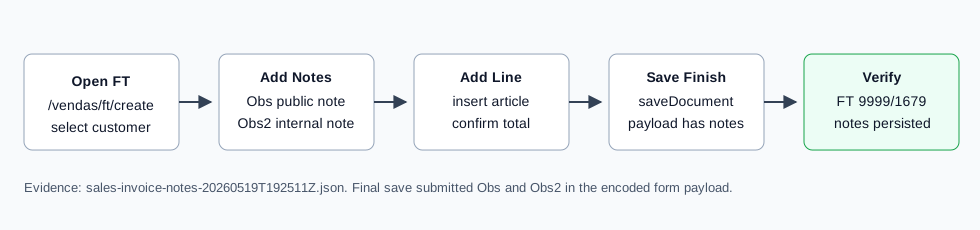
- Open Sales / Invoice [FT], then click New document, or navigate directly to
/vendas/ft/create. - Select the customer and confirm the billing fields. The verified run used customer
910, VAT509031862. - Fill the normal invoice header fields, including seller, employee, payment term, and reference if needed.
- Open the invoice notes area. The verified create form stored the public note in field
Obs/#doc_Obs. - Enter the customer/document note. The verified value was
Customer delivery note 20260519T192511Z: call before delivery. - Enter the internal note. The verified create form stored it in field
Obs2/#i_message2. - Add at least one document line. The verified run inserted article
AI-DEMO-20260519-021105, quantity1, warehouse1. - Click Save and Finish, then confirm the Are you sure? dialog.
- After OfficeGest opens the invoice view, reopen the note fields if necessary and confirm both notes are still stored.
Verified Behavior
| Check | Observed result |
|---|---|
| Public note field | #doc_Obs with name Obs. |
| Internal note field | #i_message2 with name Obs2. |
| Final save payload | The nested form payload submitted both Obs and Obs2. |
| Created invoice | saveDocument returned 999901679 with OKDOC, then opened /vendas/ft/view/OTk5OTAxNjc5. |
| Final view persistence | The final view retained both note values in #doc_Obs and #i_message2. |
| List state | The FT list showed FT 9999/1679 as ABR / Open, total 1.97, paid 0.00, pending 1.97. |
Backend Calls Observed
| Action or endpoint | Purpose |
|---|---|
NameEntidades | Loads customer billing data after customer selection. |
loadArtigoReducido / insertLinhaTabDoc | Loads and inserts the article line before the invoice can be saved. |
saveDocument | Saves the final FT invoice. The submitted form included referencia, Obs, and Obs2. |
DT_List_Documentos | Verifies the invoice list row after save. |
Raw evidence: raw/playwright/workflows/sales-invoice-notes-20260519T192511Z.json. Screenshots: assets/screenshots/sales-invoice-notes-20260519T192511Z-01-create-page.png, assets/screenshots/sales-invoice-notes-20260519T192511Z-02-filled-with-notes.png, and assets/screenshots/sales-invoice-notes-20260519T192511Z-03-final-view.png.