Evidence Summary
- Create route
/vendas/ft/create- Final view
/vendas/ft/view/OTk5OTAxNjgw- Created invoice
999901680 / FT 9999/1680- Customer
[910] 100 Ouvidos Lda- Vehicle
75-XU-14, Honda Vision 2018- Evidence file
raw/playwright/workflows/latest-sales-invoice-vehicle.json
When to Use This
Use the vehicle area when the invoice should be associated with a customer vehicle, such as workshop, repair, maintenance, or vehicle-related sales. The verified route used an existing vehicle already linked to customer 910.
Step-by-Step
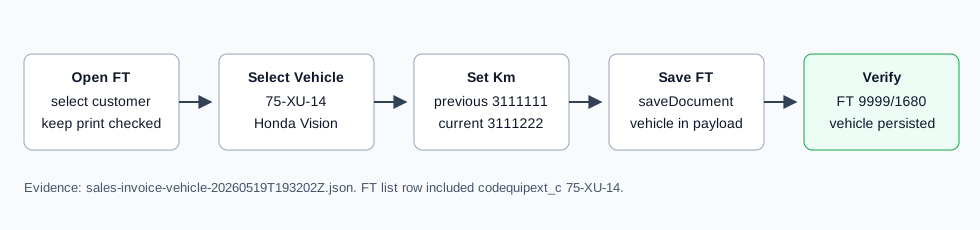
- Open Sales / Invoice [FT], then click New document, or navigate directly to
/vendas/ft/create. - In Vehicle & Entity, keep Print vehicle data checked if the vehicle data should print on the document. Clear it when the vehicle should remain internal or should not appear on the printout; see How to Hide Vehicle Details from a Sales Invoice Printout.
- Select the billing customer. The verified run selected
[910] 100 Ouvidos Lda. - Open the License Plate selector and choose the vehicle. OfficeGest filters vehicle choices by the selected customer. The verified option was
[75-XU-14] Honda Vision - 2018. - After selecting the plate, confirm OfficeGest fills the vehicle fields. The verified run filled Brand
Honda, Version2018, and Previous kms3111111. - Enter Current Km if needed. The verified run entered
3111222. - Complete the invoice header, including seller, employee, payment term, and reference.
- Add at least one document line. The verified run inserted article
AI-DEMO-20260519-021105, quantity1, warehouse1. - Click Save and Finish, then confirm the Are you sure? dialog.
- After OfficeGest opens the invoice view, confirm the vehicle area still shows the license plate and km values.
Verified Behavior
| Check | Observed result |
|---|---|
| Vehicle selector | #doc_CodEquipExt uses Sel2_viaturas and filters by selected customer owner or billing customer. |
| Selected vehicle | 75-XU-14, Honda, Vision, version 2018. |
| Kilometers | Previous km loaded as 3111111; current km was saved as 3111222. |
| Print flag | imprimirviatura was checked and submitted as on. |
| Final save payload | The nested form payload submitted CodEquipExt, Marca, Modelo, Versao, ContKmAnt, ContKmAct, and imprimirviatura. |
| List state | The FT list showed FT 9999/1680 as ABR / Open and included codequipext_c: 75-XU-14. |
Backend Calls Observed
| Action or endpoint | Purpose |
|---|---|
Sel2_viaturas | Loads active vehicles for the selected customer. For customer 910, it returned 75-XU-14 and a No registration clean option. |
NameEntidades | Loads customer billing data after customer selection. |
loadArtigoReducido / insertLinhaTabDoc | Loads and inserts the invoice article line. |
saveDocument | Saves the final FT invoice with the selected vehicle fields. |
DT_List_Documentos | Verifies the invoice list row after save, including the vehicle column value. |
Raw evidence: raw/playwright/workflows/sales-invoice-vehicle-20260519T193202Z.json. Screenshots: assets/screenshots/sales-invoice-vehicle-20260519T193202Z-01-create-page.png through assets/screenshots/sales-invoice-vehicle-20260519T193202Z-04-final-view.png.