Evidence Summary
- Workflow run
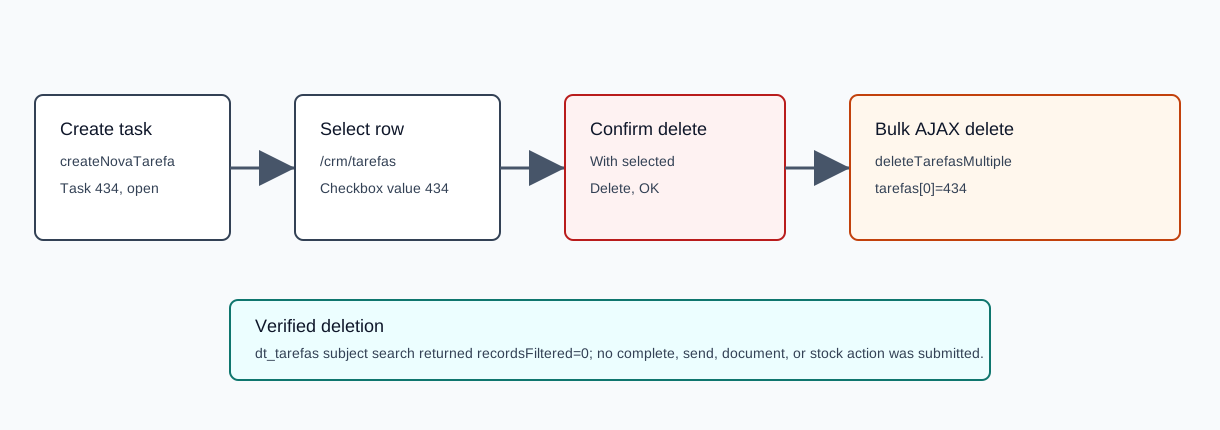
crm-task-bulk-delete-20260519T102751Z- Created and deleted task
434- Subject
AI Demo CRM Bulk Delete 20260519T102751Z- Delete result
{"sim":1,"nao":0,"list_nao":""}- Final lookup
recordsFiltered=0
Before You Start
- Open CRM then Operations then Tasks, or navigate to
/crm/tarefas. - Search and filter the grid so only the intended task rows are visible and easy to review.
- This workflow permanently removes selected tasks. The verified run used one disposable task and did not mark tasks accomplished, send SMS/email, create documents, or change stock.
Delete Selected Tasks
- Select the checkbox for each task row you intend to remove. The verified checkbox value was
434. - Open the With selected dropdown. The button updates to show the selected count.
- Choose the delete action.
- Review the confirmation dialog. The verified dialog text was
Are you sure you want to delete?with Cancel and OK. - Click OK only after confirming the selected rows are correct.
- Search again for the deleted subject or task id to confirm no row is returned.
Verified Request
The list-level delete sends an AJAX GET request to the central endpoint.
| Field | Verified value | Meaning |
|---|---|---|
endpoint | GET /ajaxserver | Central AJAX endpoint. |
action | deleteTarefasMultiple | Deletes selected CRM tasks. |
tarefas[0] | 434 | Selected task id. |
response | {"sim":1,"nao":0,"list_nao":""} | One successful deletion, zero failures. |
Confirm Deletion
- Use the task list search field to search for the deleted subject.
- Confirm the table reports no matching entries.
- If you are verifying by API, call
dt_tarefaswith the subject search and confirmrecordsFiltered=0and an emptydataarray.
The verified post-delete lookup for AI Demo CRM Bulk Delete 20260519T102751Z returned recordsTotal=82, recordsFiltered=0, and no rows.
Artifacts
raw/playwright/workflows/crm-task-bulk-delete-20260519T102751Z.jsonassets/screenshots/crm-task-bulk-delete-20260519T102751Z-04-task-list-filtered-before-bulk-delete.pngassets/screenshots/crm-task-bulk-delete-20260519T102751Z-05-task-selected.pngassets/screenshots/crm-task-bulk-delete-20260519T102751Z-06-bulk-delete-confirmation.pngassets/screenshots/crm-task-bulk-delete-20260519T102751Z-07-task-list-after-bulk-delete.png