Evidence Summary
- Workflow run
crm-task-complete-20260519T094911Z- Updated task
431- Final subject
AI Demo CRM Task 20260519T094141Z Completed- Final state
Realizado=Tandperc_execution=100
Before You Start
- Open CRM then Operations then Tasks, or navigate to
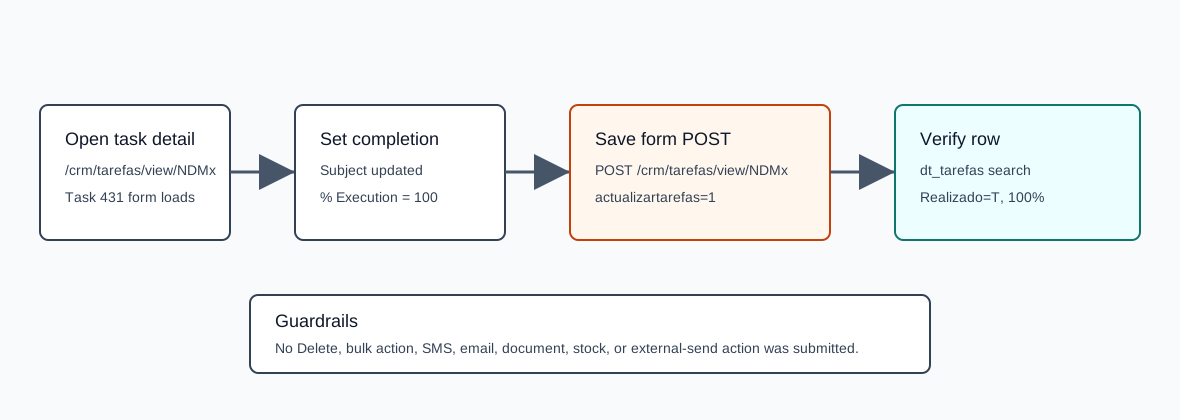
/crm/tarefas. - Find the task in the Tasks list and open its detail page. The verified task detail route was
/crm/tarefas/view/NDMx, whereNDMxis the encoded id for task431. - This workflow updates an existing CRM task only. The verified run did not delete records, use bulk actions, send SMS/email, create documents, or change stock.
Complete the Task
- Open the task detail page.
- Review the Task Data card: Accomplished, Subject, % Execution, Task Type, Priority, Employee responsible, Estimated End Date, Time, operator registration, and registration date.
- Set % Execution to
100. In the verified UI this automatically checked Accomplished. - Adjust the Subject or notes only if needed. The verified run changed the subject to
AI Demo CRM Task 20260519T094141Z Completed. - Click Save.
- Confirm that the page reloads and shows the success message Task Data written successfully.
Verified Payload
The Save button validates #marcacao_datalocal and submits a normal page POST to the same detail route.
| Field | Verified value | Meaning |
|---|---|---|
endpoint | POST /crm/tarefas/view/NDMx | Updates task 431. |
actualizartarefas | 1 | Signals task detail update. |
assunto | AI Demo CRM Task 20260519T094141Z Completed | Task subject. |
perc_execution | 100 | Completion percentage. This drove the completed state. |
codtipoev | ToDo | Task type. |
prioridade | N | Standard priority. |
codempr | 1 | Responsible employee, Demo. |
data, hour, minute, hora | 19/05/2026, 16, 45, 16:45 | Estimated end date/time. |
relatorio / relatorio2 | empty | Additional description fields were not changed. |
codterc / codcontacto | empty | No entity or contact was linked. |
Confirm Completion
- Return to the Tasks list at
/crm/tarefas. - Search by the updated subject.
- Confirm the row for task
431showsRealizado=Tandperc_execution=100.
The verified dt_tarefas lookup returned one matching row with numrel=431, Assunto=AI Demo CRM Task 20260519T094141Z Completed, CodTipoEv=ToDo, FDataPrevRealiz=19/05/2026 16:45, Realizado=T, perc_execution=100, and Prioridade=N.
This was the state immediately after the completion run. A later verified reopen/edit workflow changed the same demo task to Realizado=F and perc_execution=0.
Artifacts
raw/playwright/workflows/crm-task-complete-20260519T094911Z.jsonassets/screenshots/crm-task-complete-20260519T094911Z-01-task-detail-before.pngassets/screenshots/crm-task-complete-20260519T094911Z-02-task-detail-completed-filled.pngassets/screenshots/crm-task-complete-20260519T094911Z-03-task-detail-after-save.png