Evidence Summary
- Invoice view
/vendas/ft/view/OTk5OTAxNjk5- Source invoice
999901699 / FT 9999/1699- Menu path
- Communicate / Copy document`s public link
- Public URL
https://pdoc.officegest.com/rwsCRlSDlOXcA36UO7Y- Evidence file
raw/playwright/workflows/latest-sales-invoice-copy-public-link.json
When to Use This
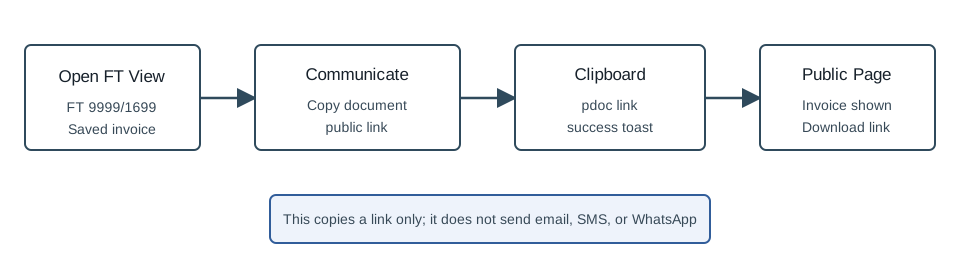
Use this when a user wants a shareable link to the already-issued invoice. The verified action only copies the link to the browser clipboard and shows a success toast; it does not send email, SMS, or WhatsApp.
Step-by-Step
- Open Sales / Invoice [FT].
- Find the invoice in the list and open its view page. The verified run used
FT 9999/1699. - On the invoice view action bar, click Communicate.
- Choose Copy document`s public link.
- Wait for the Successfully copied toast.
- Paste the clipboard value where needed. The copied link should start with
https://pdoc.officegest.com/. - Open the copied link if you need to confirm it. The public page should show the invoice number, customer, amount, and Download.
Communicate Menu Choices
| Menu item | Use it for |
|---|---|
| SMS | Open the SMS send modal. This can trigger an external send if completed. |
| Open the WhatsApp send flow. This can trigger an external send if completed. | |
| Send email | Open the email modal and load the document email body. This can trigger an external send if completed. |
| Copy document`s public link | Copy a public document URL to the clipboard. This is the verified safe path. |
Verified Behavior
| Check | Observed result |
|---|---|
| Menu availability | The saved FT view exposed Communicate with SMS, Whatsapp, Send email, and Copy document`s public link. |
| Embedded link | The page script contained const publicUrl = `https://pdoc.officegest.com/rwsCRlSDlOXcA36UO7Y`. |
| Clipboard result | After clicking the copy item, navigator.clipboard.readText() returned the same public URL. |
| User feedback | OfficeGest showed a Successfully copied toast that included the public URL. |
| Public page | The copied URL loaded with status 200, title OfficeGest's Public Documents, invoice FT 9999/1699, customer 100 Ouvidos Lda, amount 3.69 EUR, and Download. |
Backend Calls Observed
| Action or endpoint | Purpose |
|---|---|
counters | Loads ticket counters attached to the invoice view. |
listaTabDocumento | Loads the saved invoice line data shown on the view. |
create_document&option=calcular_totais | Recalculates view totals for the existing FT. |
navigator.clipboard.writeText | Copies the embedded public URL. No OfficeGest AJAX call is made for the copy click itself. |
https://pdoc.officegest.com/... | Public document page for the invoice, available outside the authenticated OfficeGest session. |
Raw evidence: raw/playwright/workflows/sales-invoice-copy-public-link-20260519T213057Z.json. Screenshots: assets/screenshots/sales-invoice-copy-public-link-20260519T213057Z-01-saved-invoice-view.png, assets/screenshots/sales-invoice-copy-public-link-20260519T213057Z-02-copy-success-toast.png, and assets/screenshots/sales-invoice-copy-public-link-20260519T213057Z-03-public-document-page.png.