Evidence Summary
- Route
/entidades/comerciais- Page title
OG - Business- Workflow run
create-business-20260519T032902Z- Created record
[15] AI Demo Commercial 20260519T032902Z- Final URL
/entidades/comerciais/view/MTU=- Evidence file
raw/playwright/workflows/latest-create-business.json
When to Use This
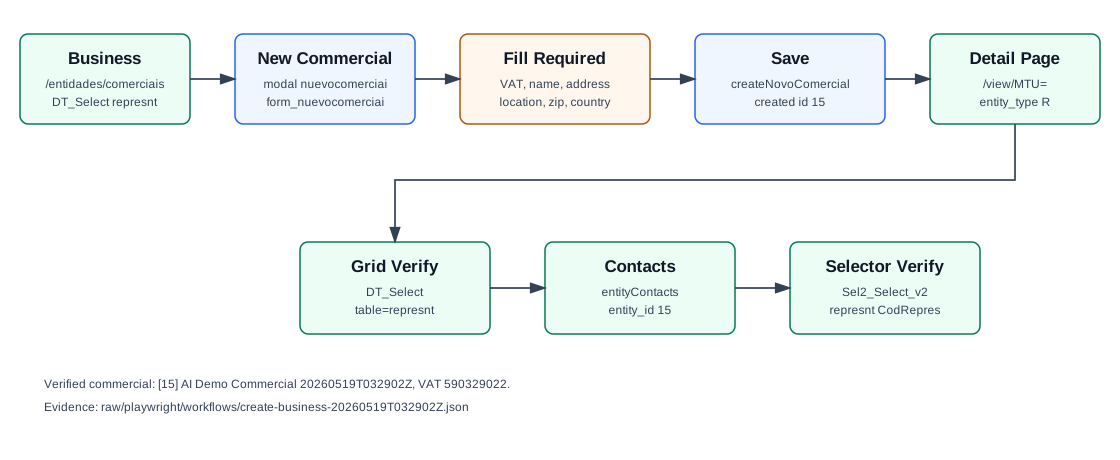
Use this workflow for commercial/sales representative records shown under Entities / Business. These records appear in representative selectors, have entity contact data, can be linked to customers and sales zones, and use entity type code R in related entity/contact requests.
Step-by-Step
- Open Entities / Business, or navigate directly to
/entidades/comerciais. - Click New Commercial. OfficeGest opens modal
nuevocomerciaiwith formform_nuevocomerciai. - Enter the required VAT Number.
- Enter the required identity and address fields: Name, Address, Location, and Zip Code.
- Confirm Country. The verified run used Portugal, stored as
CodPais=PT. - Optionally enter Email, Phone, and Cell phone.
- Click Save. OfficeGest posts
createNovoComercial. - OfficeGest redirects to the commercial detail page. The verified final URL was
/entidades/comerciais/view/MTU=. - Confirm the record through the Business grid. The grid uses
DT_Selectwithtable=represnt.
Required and Default Fields
| Field | Verified behavior |
|---|---|
| VAT Number | Required. Stored as NContrib. |
| Name | Required. Stored as Nome. |
| Address | Required. Stored as Morada. |
| Location | Required. Stored as Localidade. |
| Zip Code | Required. Stored as CodPostal. |
| Country | Required. The modal defaulted to Portugal / PT. |
| Optional in the visible form. The detail page retained the full address; the grid display truncated it to the visible column width/data payload. | |
| Phone and Cell phone | Optional. Saved values include the country prefix, for example +351.244000006 and +351.969032902. |
Verified Created Record
| Field | Value |
|---|---|
| Commercial id | 15 |
| Name | AI Demo Commercial 20260519T032902Z |
| VAT | 590329022 |
| Address | Rua Comercial Demo 19 |
| Location | Leiria |
| Zip Code | 2400-006 |
ai-demo-commercial-20260519t032902z@example.invalid | |
| Phone | +351.244000006 |
| Cell phone | +351.969032902 |
| Status | Activo: T |
Backend Calls Observed
| Action or endpoint | Purpose |
|---|---|
DT_Select&table=represnt | Loads the Business grid. The verified list response contained row CodRepres: 15. |
loadForm | Triggered when the modal opens. The full form is also present in the route DOM as form_nuevocomerciai. |
createNovoComercial | Creates the commercial record. The payload included NContrib, Nome, Morada, Localidade, CodPostal, CodPais, EMail, phone, and mobile. |
entidades&option=entityContacts | Loads contact cards on the created commercial detail page with entity_type=R and entity_id=15. |
Sel2_Select_arrays | Resolves the commercial in the all-entities selector with aent.tipo=R. |
Sel2_Select_v2 | Resolves the representative selector with table=represnt, id=CodRepres, and value=Nome. |
NameEntidades | Lookup probes with tabla=Represnt, tabla=Repres, and tabla=Comercial returned []; representative data was verified through DT_Select and selectors instead. |
Raw evidence: raw/playwright/workflows/create-business-20260519T032902Z.json. Screenshots: assets/screenshots/create-business-20260519T032902Z-01-business-list.png through assets/screenshots/create-business-20260519T032902Z-05-verified-list.png.
Detail View Context
After save, the detail page showed tabs/areas for General, Sales Zones, Customers, Extra Fields, Tags, Loyalty, Tickets, Attachments, and GDPR. The general area showed active state, name, VAT number, address, location, zip code, state, country, commission type, GDPR authorization fields, observations, and entity contact cards.