Evidence Summary
- Route
/entidades/contactos- Page title
OG - Contacts- Workflow run
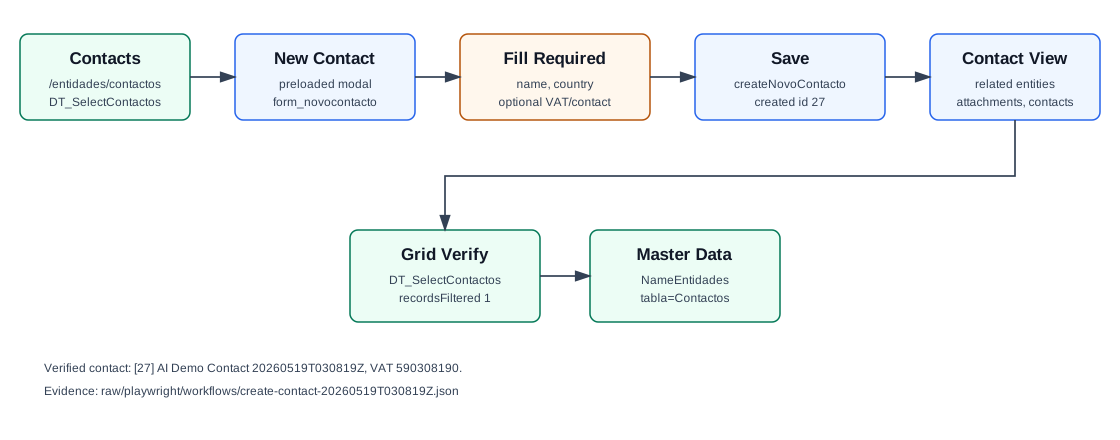
create-contact-20260519T030819Z- Created contact
[27] AI Demo Contact 20260519T030819Z- Verification
DT_SelectContactosreturnedrecordsFiltered: 1- Evidence file
raw/playwright/workflows/latest-create-contact.json
When to Use This
Use this workflow for a standalone person or contact record that may later be associated with customers, suppliers, CRM work, attachments, or tickets, without creating a full customer or supplier account.
Step-by-Step
- Open Entities / Contacts, or navigate directly to
/entidades/contactos. - Click New Contact. The contact form is already present on the page as
form_novocontacto; the click opens the modal rather than fetching it throughloadForm. - Enter Name. This is the only identity field required in the visible form.
- Choose Country. The verified run used Portugal, stored as
CodPais=PT. - Optionally enter VAT Number, Address, Location, Zip Code, Email, Phone, and Cell phone.
- Click Save. OfficeGest posts
createNovoContacto. - After saving, OfficeGest loads contact counters and related-entity selectors for the newly created contact.
- Search the Contacts grid by name or VAT number to confirm the new contact appears. The verified record returned
recordsFiltered: 1.
Required and Default Fields
| Field | Verified behavior |
|---|---|
| Name | Required. Stored as Nome. |
| Country | Required in the route crawl and defaults to Portugal / PT. |
| VAT Number | Optional. Stored as NContrib. |
| Address | Optional. Stored as Morada. |
| Location | Optional. Stored as Localidade. |
| Zip Code | Optional. Stored as CodPostal. The page called a postal-code selector endpoint after save. |
Optional. Stored as EMail. | |
| Phone and Cell phone | Optional. Prefix and number are combined on the saved record, for example +351.244000003 and +351.939030819. |
Verified Created Record
| Field | Value |
|---|---|
| Contact id | 27 |
| Name | AI Demo Contact 20260519T030819Z |
| VAT | 590308190 |
| Address | Rua Contacto Demo 19 |
| Location | Leiria |
| Zip Code | 2400-003 |
ai-demo-contact-20260519t030819z@example.invalid | |
| Phone | +351.244000003 |
| Cell phone | +351.939030819 |
| Status | Activo: T |
Backend Calls Observed
| Action | Purpose |
|---|---|
DT_SelectContactos | Loads and filters the Contacts grid. The verified lookup by contact name returned one row for id 27. |
createNovoContacto | Creates the contact. The response returned id: 27 and the saved contact fields. |
Sel2_Select | Looks up postal-code data and can resolve contact names for selectors. |
counters&option=contactos | Loads counts for contact tabs such as related entities and attachments. |
counters&option=tickets_abertos | Loads open-ticket count for the contact using entity_type=T and entity_code=27. |
Sel2_Select_arrays | Resolves the contact in the all-entities selector with aent.tipo=T. |
NameEntidades | Reads the created contact by CodContacto. The correct table parameter is tabla=Contactos; tabla=Contacto returned an empty array. |
Raw evidence: raw/playwright/workflows/create-contact-20260519T030819Z.json. Screenshots: assets/screenshots/create-contact-20260519T030819Z-01-contacts-list.png through assets/screenshots/create-contact-20260519T030819Z-05-verified-list.png.
Validation Notes
- Contacts are a distinct entity type from customers and suppliers. In selectors, the all-entities type code observed for contacts is
T. - The New Contact form is not loaded with
loadForm; it is already present in the contacts page markup. - The list page initially fires two DataTables requests: one broad pass and one active-only pass with
Activo=T. - Contact creation does not generate an accounting account; customers and suppliers do.