Evidence Summary
- Create route
/vendas/nc/create- List route
/vendas/nc- Final view
/vendas/nc/view/OTk5OTAwMDU5- Workflow run
credit-note-nc-20260519T050026Z- Created document
999900059 / NC 9999/59- Evidence file
raw/playwright/workflows/latest-credit-note-nc.json
When to Use This
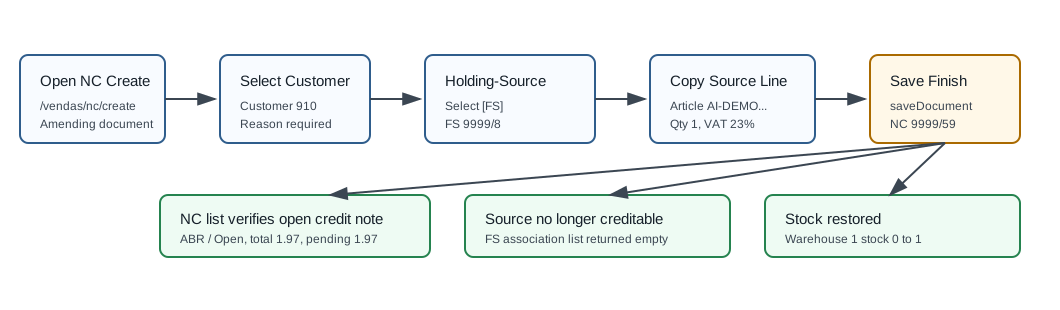
Use Credit note [NC] when you need to credit or reverse all or part of a previous customer sales document. The verified OfficeGest flow requires an amendment reason and normally starts by associating a source document under Holding-Source.
Step-by-Step
- Open Sales / Amending / Credit note [NC], then click Create Credit Note, or navigate directly to
/vendas/nc/create. - Select the customer. The verified run used customer
910, 100 Ouvidos Lda, VAT509031862. - Confirm the document series and employee/commercial fields. The verified run used series
9999, employeeDemo, commercialComercial 1, and payment termPP. - Select a Reason. The verified run used reason
1, Erro de faturação. The reason list is loaded frommotivos_docswhereis_nc=1. - In Holding-Source, choose the source document type. The verified run used [FS] Simplified invoice.
- Select the source document. The verified run selected
999900008 / FS 9999/8, dated19/05/2026, with net value1.60. - Choose the source line quantity to credit. The verified run credited line
1, articleAI-DEMO-20260519-021105, quantity1, unit price1.60, VAT23%. - Click the association modal Save. OfficeGest copies the selected source line into the NC draft and calculates gross
1.60, VAT0.37, and total1.97. - Click Save and Finish, then confirm the Are you sure? dialog if shown.
- OfficeGest posts
saveDocument, redirects to the NC view, and creates an open credit note. The verified save response was999900059%OK&=&OKDOC&=&. - Search the NC list for
999900059. The verified row showed statusABR/ Open, paid value0.00, pending value1.97, and reference copied from the source FS document.
Verified Credit Note Values
| Field | Value |
|---|---|
| Internal number | 999900059 |
| Visible document number | NC 9999/59 |
| Source document | 999900008 / FS 9999/8 |
| Source line | Article AI-DEMO-20260519-021105, quantity 1, warehouse 1. |
| Reason | 1, Erro de faturação |
| Customer | [910] 100 Ouvidos Lda, VAT 509031862 |
| Status | ABR, visible as Open |
| Total | 1.97; paid 0.00; pending 1.97. |
| Source association result | The post-save source association list for customer 910 and source type FS returned an empty list, meaning FS 9999/8 was fully credited for NC association. |
| Stock effect | Warehouse 1 stock for the demo article changed from 0 to 1; customer-order and supplier-order quantities stayed 1. |
Backend Calls Observed
| Action or endpoint | Purpose |
|---|---|
DT_List_Documentos&table=NCred | Loads and verifies credit notes with typesaft=NC, tipoop=NC, and actualizacc=T. |
Sel2_Select_v2&table=motivos_docs | Loads NC reasons with filter where[is_nc]=1. The observed options included Adiantamento and Erro de faturação. |
NameEntidades | Loads customer master data for customer 910. |
associar_documento&option=load_modal | Opens the source-document association modal for selected type FS. |
associar_documento&option=listar_documentos | Lists creditable source documents. Before save it returned FS 9999/8; after save it returned an empty list. |
associar_documento&option=listar_tabela | Loads source lines for the selected FS document. |
associar_documento&option=save_linhas | Copies the selected source line into the NC temporary table. |
listaTabDocumento | Loads the NC draft line before save and on the final view. |
create_document&option=calcular_totais | Calculates gross, VAT, retention, and total. |
saveDocument | Creates the NC document. The verified response was {"return":"999900059%OK&=&OKDOC&=&","print_documents":[]}. |
dt_list_recalc_stock_articles_lojas | Confirms stock changed from 0 to 1 in warehouse 1. |
Raw evidence: raw/playwright/workflows/credit-note-nc-20260519T050026Z.json. Screenshots: assets/screenshots/credit-note-nc-20260519T050026Z-01-create-page.png through assets/screenshots/credit-note-nc-20260519T050026Z-05-nc-list.png.