Starting Point
- Open Entities / Customers, or navigate directly to
/entidades/clientes. - The page title is OG - Customers.
- The grid lists customers with columns for code, name, balance, cell phone, country, VAT number, accounting account, and active state.
Verified Screen Flow
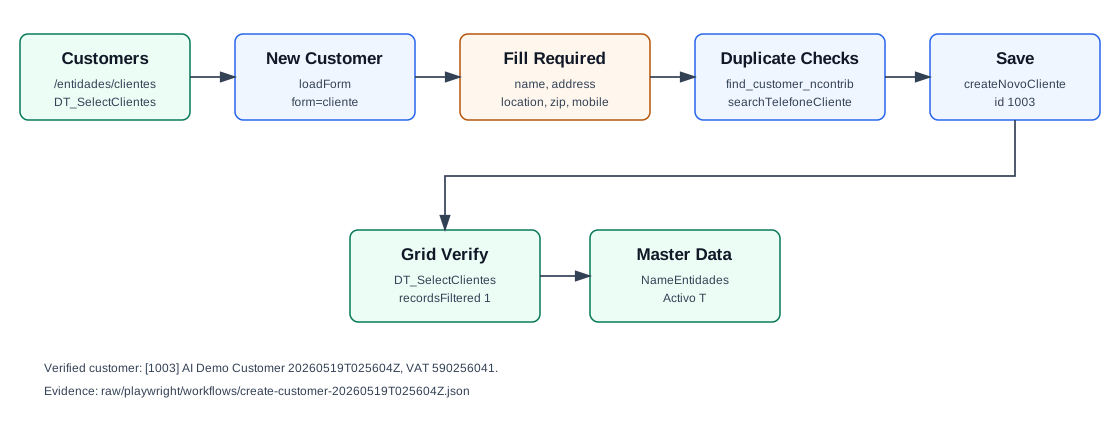
- Click New Customer.
- OfficeGest opens the side modal Add new customer.
- Choose the Customer Type. The verified run used Company, stored as
TipoCliente=E. - Choose Country. The verified run used Portugal, stored as
CodPais=PT. - Enter a VAT number. OfficeGest checks duplicates with
entidades&option=find_customer_ncontrib. A duplicate VAT can open a warning modal: The specified tax number already exists. - Enter the required identity and address fields: Name, Address, Location, Zip Code, and Cell phone.
- Optionally fill Email, Phone, Referrer Type, Payment Meth., Classification, No. Beneficiary, and GDPR/campaign permission fields.
- Click Save. OfficeGest posts
createNovoCliente. - Confirm the success toast/message Data written successfully.
- Search the Customers grid for the name. The verified record returned
recordsFiltered: 1.
Required and Default Fields
| Field | Verified behavior |
|---|---|
| Customer Type | Defaults to Company. Other choices observed: Company Sole Proprietors and Particular. |
| Country | Required. Defaults to Portugal / PT. |
| VAT Number | Optional in the HTML form but checked for duplicates when filled. |
| Name | Required. Stored as Nome. |
| Address | Required. Stored as Morada. |
| Location | Required. Stored as Localidade. |
| Zip Code | Required. Stored as CodPostal. |
| Cell phone | Required in the form. OfficeGest stores the selected prefix and the number as a single value, for example +351.919025604. |
| Payment Meth. | Default observed: PP / Pronto Pagamento. |
| Classification | Default observed: CF / Cliente Final. |
Verified Created Record
| Field | Value |
|---|---|
| Customer id | 1003 |
| Name | AI Demo Customer 20260519T025604Z |
| VAT | 590256041 |
| Address | Rua Demo 19 |
| Location | Leiria |
| Zip Code | 2400-001 |
ai-demo-customer-20260519t025604z@example.invalid | |
| Phone | +351.244000001 |
| Cell phone | +351.919025604 |
| Accounting account | 2111101003 |
| Status | Activo: T |
Backend Calls Observed
| Action | Purpose |
|---|---|
DT_SelectClientes | Loads and filters the customer grid. The verified lookup by customer name returned one row for id 1003. |
loadForm&form=cliente&id=novocliente | Loads the New Customer modal HTML, including the duplicate VAT warning modal and the fields listed above. |
entidades&option=find_customer_ncontrib | Checks whether a VAT number already exists. |
searchTelefoneCliente | Checks phone and mobile values for possible existing customer matches. |
createNovoCliente | Creates the customer. The response returned id: 1003 and a data object with the saved fields. |
NameEntidades | Reads the created customer by CodTerc, returning the full customer master-data record. |
Raw evidence: raw/playwright/workflows/create-customer-20260519T025604Z.json. Screenshots: assets/screenshots/create-customer-20260519T025604Z-01-customers-list.png through assets/screenshots/create-customer-20260519T025604Z-05-verified-list.png.
Validation Notes
- The New Customer modal contains a dedicated duplicate VAT warning modal titled The specified tax number already exists.
- Phone and mobile duplicate checks run independently through
searchTelefoneCliente. - The list page may initially fire two DataTables requests: one empty pass and one filtered to active customers.
- The customer stays on the Customers page after save; success is shown in-page rather than by a redirect.