Evidence Summary
- Create route
/vendas/rp/create- List route
/vendas/rp- Workflow run
deferred-receipt-rp-20260519T065002Z- Created deferred receipt
999900009 / RP 9999/9- Evidence file
raw/playwright/workflows/latest-deferred-receipt-rp.json
When to Use This
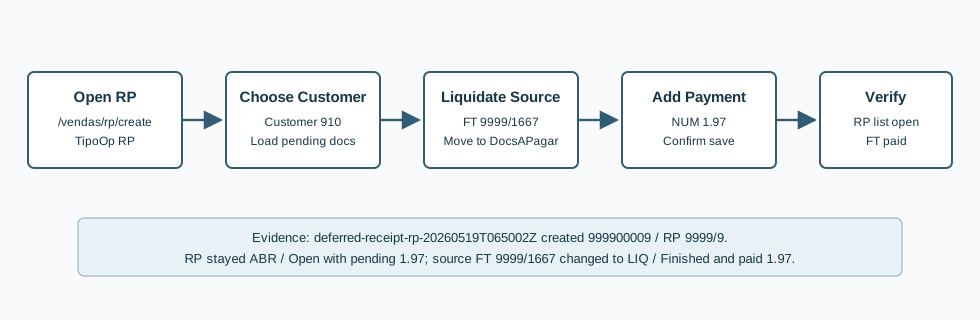
Use Deferred receipt [RP] when registering a deferred receipt against open customer documents. It uses the same pending-document and payment machinery as Receipt [R], but the resulting RP document stays open in the RP list while the selected source invoice is marked paid.
Step-by-Step
- Open Sales / Deferred receipt [RP], then click New deferred receipt, or navigate directly to
/vendas/rp/create. - Confirm the page title is OG - Deferred receipt [RP]. The create form includes Entity, Details, Recomendations, and Document.
- Select the customer. The verified run used customer
910, 100 Ouvidos Lda, VAT509031862. - Confirm the series and collaborator. The verified run used series
9999and collaboratorDemo. - OfficeGest loads pending documents into Outstanding documents. The verified pending row was
999901667 / FT 9999/1667, total1.97, paid value0.00, pending value1.97, due date20/05/2026. - Select the document to settle and click Liquidate. OfficeGest calls
changeEstadoReciboand moves the selected row from pending documents into Documents. - Confirm Total and Value to Pay. The verified run showed
1.97. - Add a payment line. The verified run used [NUM] Numerario, which created a payment line for
1.97in cash box[0] Caixa 0. - Click End.
- Confirm the Are you sure? dialog with OK.
- OfficeGest posts
saveDocumentRecibo. The verified response was999900009&=&OKDOC&=&&=&OKDOC&=&. - Verify the RP list. The verified RP row showed
ABR/ Open, total1.97, paid value0.00, and pending value1.97. - Verify the source invoice.
FT 9999/1667changed fromABR/ Open and unpaid toLIQ/ Finished withValorPago=1.97and pending value0.00.
Verified RP Values
| Field | Value |
|---|---|
| RP internal number | 999900009 |
| Visible RP number | RP 9999/9 |
| Customer | [910] 100 Ouvidos Lda, VAT 509031862 |
| Route/list identity | /vendas/rp, table DocumRP, typesaft=RG, tipoop=RP, oficinas=F, recibo=T, actualizacc=T. |
| RP status | ABR, visible as Open; validation N/D. |
| Settled document | 999901667 / FT 9999/1667. |
| Payment | [NUM] Numerario, inbox [0] Caixa 0, value 1.97. |
| RP total | Total 1.97; paid 0.00; pending 1.97. |
| Source invoice result | Invoice changed to LIQ / Finished, ValorPago=1.97, pending value 0.00. |
Backend Calls Observed
| Action or endpoint | Purpose |
|---|---|
DT_List_Documentos&table=DocumRP | Loads and verifies deferred receipts with typesaft=RG, tipoop=RP, and recibo=T. |
loadTabDocumentoRecibo | Initializes receipt/deferred receipt document data after selecting the customer. |
listaTabDocumentoRecibo&estado=F | Loads outstanding customer documents still pending payment. |
changeEstadoRecibo | Moves the selected source invoice row from outstanding documents to documents to pay. The verified payload used temporary receipt table 47557 and selected FT 9999/1667. |
listaTabDocumentoRecibo&estado=T | Loads documents selected for settlement; the verified selected row was FT 9999/1667. |
payment&option=add | Adds the RP payment line. The verified request used modopagamento=NUM, modobase=N, total=1.97, and tipoop=RP. |
payment&option=validate | Checks payment coverage before final save. |
saveDocumentRecibo | Saves the deferred receipt. The verified response returned 999900009 with OKDOC. |
DT_List_Documentos&table=Fact | Verifies the source FT invoice was settled after RP save. |
Raw evidence: raw/playwright/workflows/deferred-receipt-rp-20260519T065002Z.json. Probe evidence: raw/playwright/vendas-rp-create-probe.json. Screenshots: assets/screenshots/deferred-receipt-rp-20260519T065002Z-01-create-page.png through assets/screenshots/deferred-receipt-rp-20260519T065002Z-05-rp-list.png.
Validation Notes
- RP uses receipt tables and payment functions: the page exposes
DocsPendentes,DocsAPagar,add_payment, andsendForm. - RP state differs from R: the source invoice was settled, but the RP document itself stayed
ABR/ Open in the RP list. - Select the intended document carefully: the demo customer can have many pending rows, so the verified run isolated
FT 9999/1667.