Evidence Summary
- Workflow run
crm-gift-certificate-create-delete-20260519T124723Z- Certificate id
123- Certificate number
AI124723000001- Value/status
1.00/ACT- Final state
- Deleted and absent from
DT_Select
Create Gift Cards
- Open
/crm/valesoferta. - Click Create gift cards.
- Fill Prefix, Value, and Total.
- Optionally set Validity until.
- Click Save.
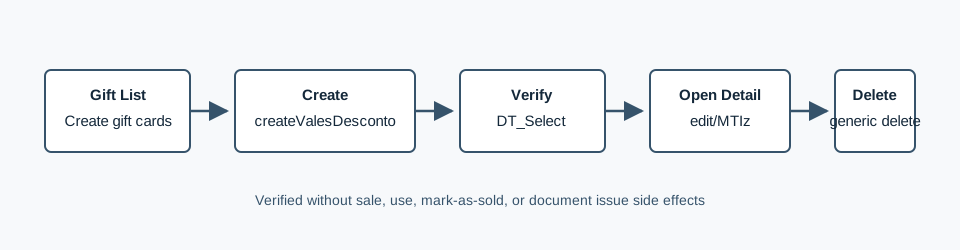
The verified create used createValesDesconto with serialized form prefixo=AI124723&valor=1&total=1&data_validade=. The endpoint returned {"success":true}, and OfficeGest generated number AI124723000001.
Verify the Certificate
The list uses DT_Select with table=vales_oferta, columns=*, and order=id. The verified row returned id 123, prefix AI124723, sequence 1, number AI124723000001, value 1, status ACT, and amount credited 0.
The detail route /crm/valesoferta/edit/MTIz showed the gift-card number, status Active, value, amount credited, purchase-document fields, validity, and a documents tab.
Delete a Gift Certificate
The verified cleanup used the generic delete endpoint: action=delete, tabela=vales_oferta, and search[id]=123. The response was bare JSON true. The next DT_Select lookup returned no row for AI124723000001.
Operationally, gift certificates also expose a With selected flow for marking active certificates as sold. That separate workflow is now verified in How to Mark a CRM Gift Certificate as Sold. This create/delete run did not use the certificate in a sale or issue any document.
Artifacts
raw/playwright/workflows/crm-gift-certificate-create-delete-20260519T124723Z.jsonassets/screenshots/crm-gift-certificate-create-delete-20260519T124723Z-01-list-before-create.pngassets/screenshots/crm-gift-certificate-create-delete-20260519T124723Z-02-detail-after-create.pngassets/screenshots/crm-gift-certificate-create-delete-20260519T124723Z-03-list-after-delete.png