Evidence Summary
- Workflow run
crm-campaign-create-edit-delete-20260519T125631Z- Campaign code
AI125631- Final edited description
AI Demo CRM Campaign Edited 20260519T125631Z- Final state
- Deleted and absent from
DT_Select
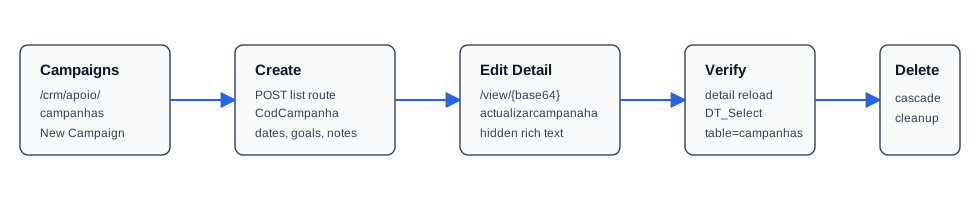
Create a Campaign
- Open
/crm/apoio/campanhas. - Click New Campaign.
- Fill Cd.Campanha, Description, Initial Date, End Date, Goals, and Description notes.
- Click Save.
The verified duplicate preflight used SearchIfExistCodCampanaha and returned F. Creation is a normal POST /crm/apoio/campanhas with CodCampanha, Designacao, DataIni, DataFim, Objectivos, and Descricao.
Edit the Campaign
Open /crm/apoio/campanhas/view/QUkxMjU2MzE=. The detail form is campanhavalidateview and posts back to the same detail route with actualizarcampanaha=1.
The verified edit changed the description, start date to 20/05/2026, end date to 31/05/2026, rich-text description notes, and rich-text goals. The rich-text editors mirror their content into hidden descricao_val and objectivos_val fields before submit.
Verify and Delete
The list uses DT_Select with table=campanhas, columns=CodCampanha,Designacao,Objectivos,DataIni,DataFim,Activo, and order=CodCampanha. The edited row returned active flag T, edited objectives, FDataIni=20/05/2026 00:00:00, and FDataFim=31/05/2026 00:00:00.
Deletion uses deleteAttachmentCascade with tabela=campanhas, search[CodCampanha]=AI125631, and searchAt[CodCampanha]=AI125631. The response returned {"succeeded":true}, and the final list lookup returned no matching row.
Artifacts
raw/playwright/workflows/crm-campaign-create-edit-delete-20260519T125631Z.jsonassets/screenshots/crm-campaign-create-edit-delete-20260519T125631Z-01-list-before-create.pngassets/screenshots/crm-campaign-create-edit-delete-20260519T125631Z-02-detail-before-edit.pngassets/screenshots/crm-campaign-create-edit-delete-20260519T125631Z-03-detail-after-edit.pngassets/screenshots/crm-campaign-create-edit-delete-20260519T125631Z-04-list-after-delete.png