Evidence Summary
- Workflow run
crm-pipeline-create-edit-delete-20260519T130232Z- Pipeline id
9- Final edited description
AI Demo CRM Pipeline Edited 20260519T130232Z- Final state
- Deleted and absent from
DT_Select
Create a Pipeline Step
- Open
/crm/apoio/pipeline. - Click New step.
- Fill required Description.
- Optionally fill numeric Order.
- Click Save.
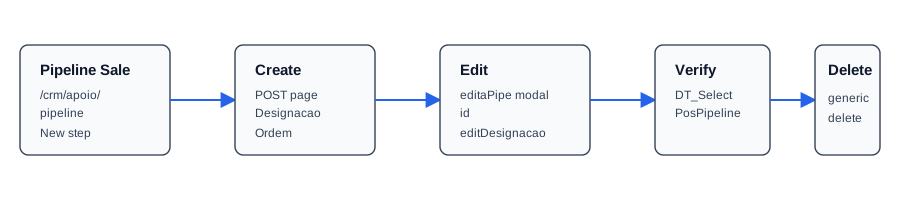
The verified create used a normal POST /crm/apoio/pipeline with Designacao=AI Demo CRM Pipeline 20260519T130232Z and Ordem=98. The next list lookup returned id 9.
Edit a Pipeline Step
The edit button calls editaPipe with the step id and loads the edit modal body. The modal exposes hidden id, text field editDesignacao, and numeric Ordem.
The verified edit posted back to /crm/apoio/pipeline with id=9, editDesignacao=AI Demo CRM Pipeline Edited 20260519T130232Z, and Ordem=99. Use editDesignacao for edits; posting Designacao without the edit field creates a new row.
Verify and Delete
The list uses DT_Select with table=PosPipeline, columns=Id, Designacao, Ordem, and order=Id. The edited row returned id 9, description AI Demo CRM Pipeline Edited 20260519T130232Z, and order 99.
Deletion uses the generic delete endpoint with action=delete, tabela=PosPipeline, and search[Id]=9. The response was bare JSON true, and the final list lookup returned no matching row.
Artifacts
raw/playwright/workflows/crm-pipeline-create-edit-delete-20260519T130232Z.jsonassets/screenshots/crm-pipeline-create-edit-delete-20260519T130232Z-01-list-before-create.pngassets/screenshots/crm-pipeline-create-edit-delete-20260519T130232Z-02-list-after-create.pngassets/screenshots/crm-pipeline-create-edit-delete-20260519T130232Z-03-list-after-edit.pngassets/screenshots/crm-pipeline-create-edit-delete-20260519T130232Z-04-list-after-delete.png