Evidence Summary
- Workflow run
crm-task-type-create-edit-delete-20260519T130724Z- Task type code
AI0724- Final edited description
AI Demo CRM Task Type Edited 20260519T130724Z- Final state
- Deleted and absent from
crm_tipotarefas/dt
Create a Task Type
- Open
/crm/apoio/tipotarefa. - Click New.
- Fill required Code, Description, Icon, and Colors.
- Set Active as needed.
- Click Save.
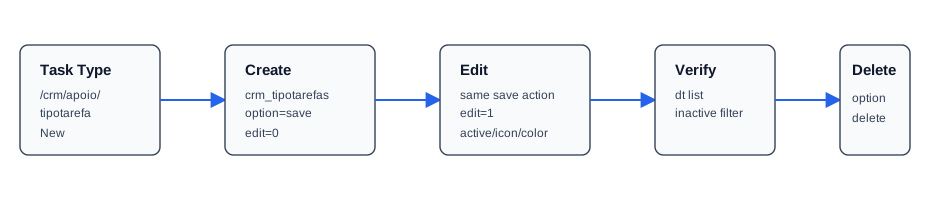
The verified create used crm_tipotarefas with option=save and serialized form edit=0&codtipoev=AI0724&description=AI Demo CRM Task Type 20260519T130724Z&icon=fa fa-tasks&color=blue&active=1. The response returned {"success":true}.
Edit and Filter
The same save endpoint edits existing task types when the serialized form contains edit=1 and the existing codtipoev. The verified edit changed description, icon to fa fa-phone, color to red, and active flag to 0.
The list endpoint is crm_tipotarefas with option=dt and active filter. The verified inactive filter used active=0 and returned the edited inactive row.
Delete
Deletion uses crm_tipotarefas with option=delete and id=AI0724. The response returned {"success":true}, and the final all-status list lookup returned no row for the code.
Artifacts
raw/playwright/workflows/crm-task-type-create-edit-delete-20260519T130724Z.jsonassets/screenshots/crm-task-type-create-edit-delete-20260519T130724Z-01-list-before-create.pngassets/screenshots/crm-task-type-create-edit-delete-20260519T130724Z-02-list-after-create.pngassets/screenshots/crm-task-type-create-edit-delete-20260519T130724Z-03-list-after-edit.pngassets/screenshots/crm-task-type-create-edit-delete-20260519T130724Z-04-list-after-delete.png