Evidence Summary
- Route
/entidades/empregados- Page title
OfficeGest- Workflow run
create-employee-20260519T031958Z- Created employee
[122] AI Demo Employee 20260519T031958Z- Verification
dt_select_empreg_depreturnedrecordsFiltered: 1- Evidence file
raw/playwright/workflows/latest-create-employee.json
When to Use This
Use this workflow when a collaborator must exist as an OfficeGest employee for selectors, permissions, cash-register assignment, agenda/workshop operations, project management, tickets, HR records, web access, biometric access, or payroll-related configuration. The initial create modal captures only the minimum employee identity and access context; detailed employee profile tabs are completed after the employee exists.
Step-by-Step
- Open Entities / Employees, or navigate directly to
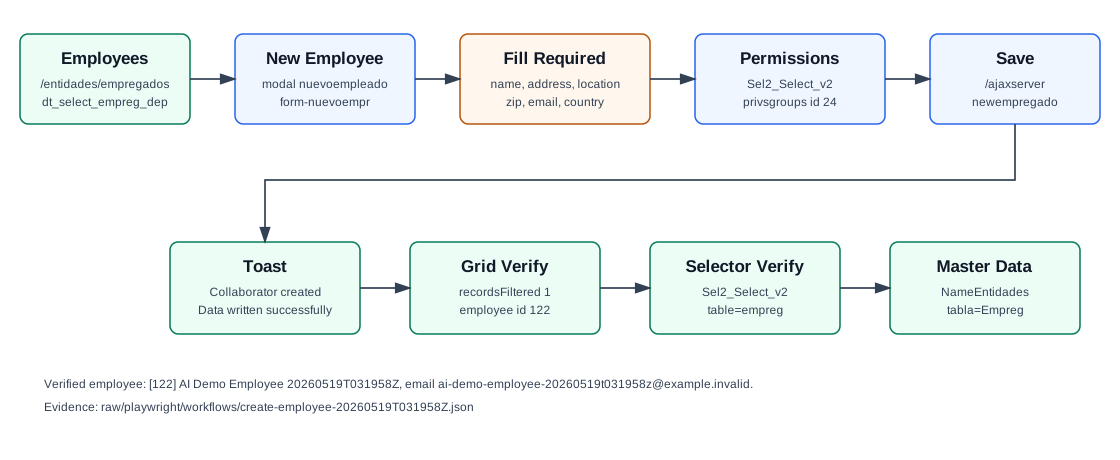
/entidades/empregados. - Click New Employee. OfficeGest opens modal
nuevoempleadowith formform-nuevoempr. - Enter the required identity fields: Name, Address, Location, Zip Code, and Email.
- Confirm Country. The verified run used Portugal, stored as
CodPais=PT. - Optionally enter Phone and Cell phone. The selected country prefix is saved with the number.
- Confirm Cash No.. The default observed value was
0, displayed as[0] Caixa 0. - Select a required Permissions group. The verified run used
[24] Santos Demoto avoid granting the broad Full Administrator profile. - Click Save. OfficeGest posts the form to
/ajaxserverwith thenewempregadosubmit field. - Confirm the success alert Collaborator ... Data written successfully.
- Search the Employees grid by name or email to confirm the employee appears.
Required and Default Fields
| Field | Verified behavior |
|---|---|
| Name | Required. Stored as Nome. |
| Address | Required. Stored as Morada. |
| Location | Required. Stored as Localidade. |
| Zip Code | Required. Stored as CodPostal. |
Required. Stored as EMail and also used as the initial web_login_c. | |
| Country | Required. The modal defaulted to PT. |
| Phone and Cell phone | Optional. Saved values include the country prefix, for example +351.244000005 and +351.959031958. |
| Cash No. | Optional with default 0 / [0] Caixa 0. Stored as NCaixa_c=0. |
| Permissions | Required. Loaded through Sel2_Select_v2 against privsgroups. The verified run selected group 24 / Santos Demo. |
Verified Created Record
| Field | Value |
|---|---|
| Employee id | 122 |
| Name | AI Demo Employee 20260519T031958Z |
| Address | Rua Employee Demo 19 |
| Location | Leiria |
| Zip Code | 2400-005 |
| Country | PT |
ai-demo-employee-20260519t031958z@example.invalid | |
| Phone | +351.244000005 |
| Cell phone | +351.959031958 |
| Permission group | 24 / Santos Demo |
| Cash register | 0 |
| Status | Activo: T |
Backend Calls Observed
| Action or endpoint | Purpose |
|---|---|
dt_select_empreg_dep | Loads and filters the Employees grid. The verified lookup by name, name column, and email returned one row for employee 122. |
Sel2_Select_v2 | Loads permission groups from privsgroups and resolves employees for selectors. The permission dropdown returned groups such as Full Administrator, Balcao, Contabilidade, Ticket, Santos Demo, and Mecanico. |
/ajaxserver form post with newempregado | Creates the employee. The payload included Nome, Morada, Localidade, CodPostal, EMail, CodPais, phone/mobile prefixes, NCaixa_c, and PrivGroup_c. |
NameEntidades | Reads full employee master data by CodEmpr. The correct table parameter is tabla=Empreg; tabla=Empregado returned an empty array. |
Raw evidence: raw/playwright/workflows/create-employee-20260519T031958Z.json. Screenshots: assets/screenshots/create-employee-20260519T031958Z-01-employees-list.png through assets/screenshots/create-employee-20260519T031958Z-05-verified-list.png.
Detail View Context
The employee detail route is broader than the create modal. The captured detail page exposes configuration areas for employee data, workshops, TPV, project management, AMS, GDPR, entity contacts, observations, identification, passport, driving license, human resources, maturity, single report, accounting, biometric settings, recurring remuneration, salaries, SEPA, extra fields, attachments, definitions, schedule, web access, panels, API access, password-change enforcement, and dashboard data.
Important default master-data values observed after creation include web_login_c set to the email, web_is_active_c=0, usaagenda=T, externo=F, tipoempreg=I, rgdp_allow_mailing=1, and serialized store/series access lists.
Validation Notes
- The visible create modal does not ask for VAT, department, HR contract, payroll, document identification, biometric, or web-password fields. Those are configured after creation in the employee detail tabs.
- The page title for the Employees route was generic
OfficeGest, while the in-page heading and menu context identify Entities / Employees. - Use
tabla=Empregfor full employee lookup.Empregadois not a validNameEntidadestable value in the verified run.