Evidence Summary
- Route
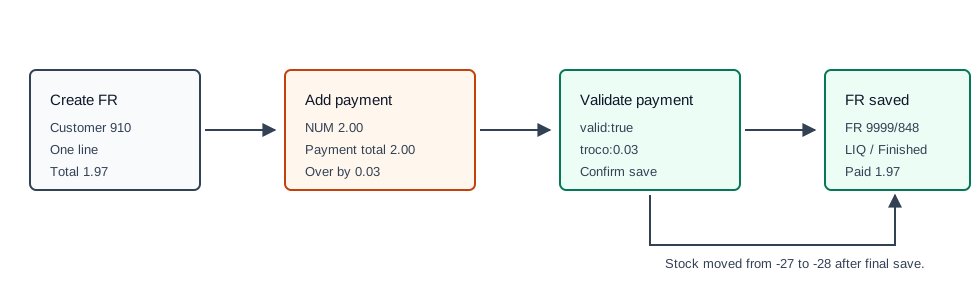
/vendas/fr/create- Final document
999900848 / FR 9999/848- Customer
[910] 100 Ouvidos Lda- Article line
AI-DEMO-20260519-021105, quantity1, total1.97- Payment
[NUM] Numerarioamount2.00; change0.03- Evidence file
raw/playwright/workflows/latest-invoice-receipt-overpayment.json
When to Use This
Use this when the customer gives more money than the invoice / receipt total, usually with cash. OfficeGest accepts the payment because it is greater than the document total and reports the difference as change.
Step-by-Step
- Create the Invoice / Receipt [FR] and confirm the document total.
- Click End to open the Payment modal.
- Select the payment method. The verified run used [NUM] Numerario.
- Enter the amount received from the customer. The verified run entered
2.00against total1.97. - Click Save in the Payment modal.
- Confirm the final save dialog if OfficeGest asks.
- Check the final FR list row. The document should be
LIQ/ Finished, with paid value equal to the document total.
Verified Behavior
| Check | Observed result |
|---|---|
| Payment row | payment&option=add created a NUM row with value 2. |
| Payment validation | payment&option=validate returned valid:true and troco:0.03. |
| Final save | saveDocument returned OKDOC and redirected to /vendas/fr/view/OTk5OTAwODQ4. |
| FR list result | FR 9999/848 was LIQ / Finished with total 1.97, ValorPago=1.97, and pending value 0.00. |
| Important distinction | The entered payment row was 2.00, but the FR list paid value stayed equal to the document total, not the cash received. |
| Stock effect | Warehouse 1 stock decreased from -27 to -28 after final save. |
Backend Calls Observed
| Action or endpoint | Purpose |
|---|---|
payment&option=add | Adds the cash row with the received amount. |
payment&option=validate | Accepts payment greater than the document total and returns the change value. |
saveDocument | Finishes the FR after payment validation succeeds. |
DT_List_Documentos | Verifies the finished FR row after save. |
Raw evidence: raw/playwright/workflows/invoice-receipt-overpayment-20260519T224642Z.json. Screenshots: assets/screenshots/invoice-receipt-overpayment-20260519T224642Z-01-fr-line-before-payment.png through assets/screenshots/invoice-receipt-overpayment-20260519T224642Z-03-fr-list.png.