Known Starting Points
- From dashboard quick links, open Factura [FT] at
/vendas/ft. - For an invoice/receipt, open Novo documento: Factura / Recibo at
/vendas/fr/create. - From the list page
/vendas/fr, use Create Invoice / Receipt.
Verified Screen Flow
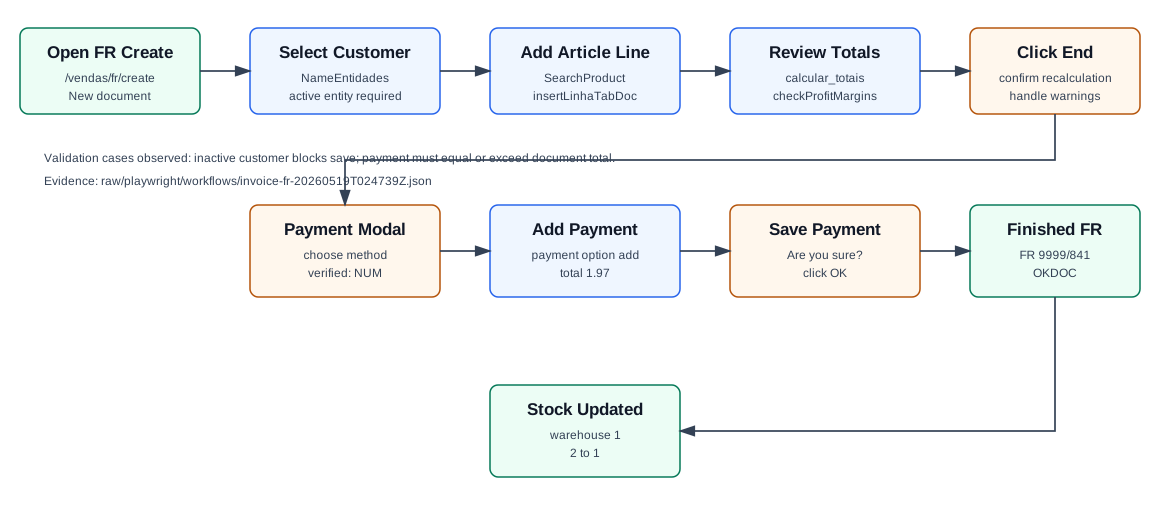
- Open the Back Office dashboard as the Demo user.
- Open Novo documento: Factura / Recibo, or navigate directly to
/vendas/fr/create. - Confirm the page title is OG - Invoice / Receipt [FR] and the heading is New document.
- In Vehicle & Entity, select an active Fact entity. The verified run used customer
910, 100 Ouvidos Lda, VAT509031862. OfficeGest loaded address, country, commercial, and payment context fromNameEntidades. - Review Delivery Method and Details. For the verified customer, OfficeGest filled delivery/discharge data, employee
Demo, commercialComercial 1, currencyEUR, tax zonePT-MA, series9999, and payment conditionPP. - Open Document / Doc. Lines. Search for an article, choose it from the autocomplete, and confirm that it appears in the line table.
- The verified line used article
AI-DEMO-20260519-021105, quantity1,00, unit price1.60, VAT23.00%, store1, and pre-save stock2,00. - Review totals. The verified totals were gross
1,60 EUR, VAT0,37 EUR, and total1,97 EUR. - Click End. If OfficeGest asks Recalculate sales prices?, click OK. The flow may also warn that the customer has documents past payment deadline.
- In the Payment modal, select a payment method. The verified path clicked [NUM] Numerario, which created a payment line for
1.97. - Click Save in the Payment modal, then confirm Are you sure? with OK.
- OfficeGest redirects to a view page, marks the document Finished, and shows payment details. The verified redirect was
/vendas/fr/view/OTk5OTAwODQx.
Fields and Tabs
| Area | What the user should check |
|---|---|
| Vehicle & Entity | Optional vehicle data, owner, fact entity, VAT number, final customer shortcut, new customer action, and loyalty context. |
| Delivery Method | Mode of delivery, load and discharge addresses, dates, times, country and postal data. Missing or inconsistent addresses can affect fiscal/shipping data. |
| Details | Employee, commercial, payment method, due date, classification, reference, currency, exchange rate, billing address, observations, series, emission date, fiscal zone, and accounting launch type. |
| Document | Article/service lines, line options, duplicate, attach, import, VAT rates, other data, profit margin, and final totals. |
| Payment modal | Payment methods such as NUM, TRA, MBW, CHQ, payment amount, cash box, estimated date, exchange, Save, and Save and Print. |
Backend Calls Observed
| Action | Purpose in the workflow |
|---|---|
NameEntidades | Loads customer master data. Customer 910 returned activo: T, address, VAT number, and commercial id. |
DT_Select_AdiantamentosClientes | Checks customer advances/open advance documents. Customer 910 had advance document FR 9999/819. |
SearchProduct / loadArtigoReducido | Searches and loads the selected article with VAT, cost, sale price, stock, warehouse, and article flags. |
insertLinhaTabDoc | Adds the article into the draft invoice line table. |
listaTabDocumento | Reloads the line table before and after save. After finalization it showed stock quantity 1. |
create_document&option=calcular_totais | Recalculates gross, VAT, retention, and document total. |
checkProfitMargins | Validates line/document margin rules. The verified line produced OK_MARGEM. |
payment&option=validate | Validates whether payment covers the document total. Before choosing a method it returned that payment was not equal to or greater than the total. |
payment&option=add | Adds the selected payment method. The verified request used modopagamento=NUM, total=1.97. |
saveDocument | Final save. The verified response was 999900841%OK&=&OKDOC&=&. |
dt_list_recalc_stock_articles_lojas | Stock verification. Warehouse 1 changed from QtdStock: 2 to QtdStock: 1. |
Raw evidence: raw/playwright/workflows/invoice-fr-20260519T024739Z.json. Screenshots: assets/screenshots/invoice-fr-20260519T024739Z-01-create-page.png through assets/screenshots/invoice-fr-20260519T024739Z-05-sales-list.png.
Validation Notes
- Inactive final customer: using Final Customer with customer
1produced Inactive billing entity! The billing entity is inactive. It added a valid line but did not save. See How to Use Final Customer During Invoicing. - Payment required: clicking Payment modal Save before choosing a payment method did not finalize. OfficeGest first requires a payment line where the paid value equals or exceeds the document total.
- Recalculation: after End, OfficeGest may ask to recalculate sales prices. Confirming this is not the final save; the user must continue to Payment and Save.
- Customer warnings: customer
910showed warnings about overdue documents and an Advances modal. These warnings did not block finalization after payment was supplied.