Evidence Summary
- Route
/entidades/prospect- Page title
OG - Prospects- Workflow run
create-prospect-20260519T031326Z- Created prospect
[22] AI Demo Prospect 20260519T031326Z- Verification
DT_Select_ProspectsreturnedrecordsFiltered: 1- Evidence file
raw/playwright/workflows/latest-create-prospect.json
When to Use This
Use this workflow for a potential customer or supplier that should be tracked commercially before becoming a full customer/supplier master record. Prospects carry classification, expected type, contact data, campaign, commercial, and business-area context.
Step-by-Step
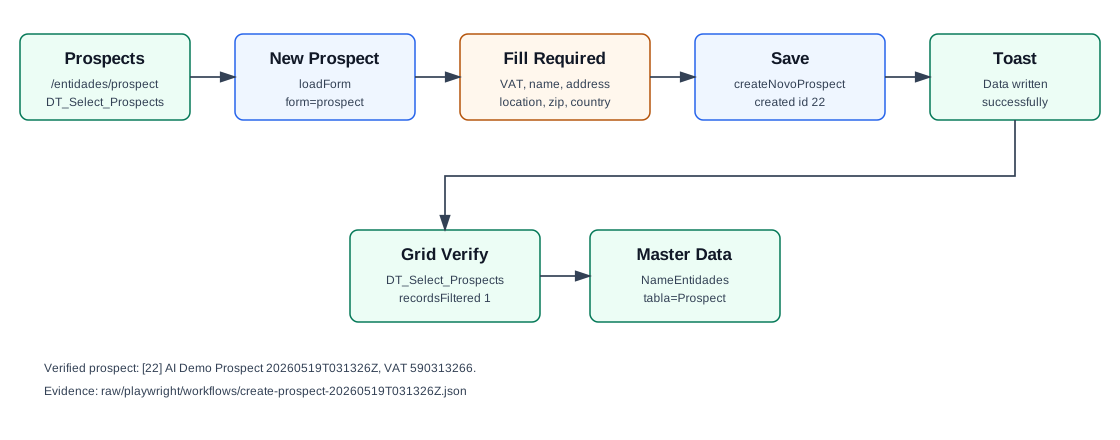
- Open Entities / Prospects, or navigate directly to
/entidades/prospect. - Click New Prospect. OfficeGest loads the side modal Add new prospect through
loadForm&form=prospect&id=novoprospect. - Choose Customer Type. The verified run used Company, stored as
TipoCliente=E. - Enter the required VAT Number.
- Choose Expected Type. The verified run used Customer, stored as
TipoProv=C. - Enter the required identity and address fields: Name, Address, Location, Zip Code, and Country.
- Optionally fill Email, Phone, Cell phone, Referrer Type, and Classification. The verified run used
CodClassif=CF/ Cliente Final. - Click Save. OfficeGest posts
createNovoProspect. - Confirm the success message Data written successfully.
- Search the Prospects grid by name or VAT number to confirm the new prospect appears.
Required and Default Fields
| Field | Verified behavior |
|---|---|
| Customer Type | Default observed: Company, stored as TipoCliente=E. |
| VAT Number | Required. Stored as NContrib. |
| Expected Type | Default observed: Customer, stored as TipoProv=C. The modal also offers Supplier. |
| Name | Required. Stored as Nome. |
| Address | Required. Stored as Morada. |
| Location | Required. Stored as Localidade. |
| Zip Code | Required. Stored as CodPostal. |
| Country | Required. The workflow used PT. |
| Email, phone, mobile | Optional; saved contact values use the selected country prefix. |
| Classification | Optional; the workflow used CF, displayed as Cliente Final. |
Verified Created Record
| Field | Value |
|---|---|
| Prospect id | 22 |
| Name | AI Demo Prospect 20260519T031326Z |
| VAT | 590313266 |
| Classification | CF / Cliente Final |
| Expected type | TipoProv=C / Customer |
| Address | Rua Prospect Demo 19 |
| Location | Leiria |
| Zip Code | 2400-004 |
ai-demo-prospect-20260519t031326z@example.invalid | |
| Phone | +351.244000004 |
| Cell phone | +351.949031326 |
| Status | Activo: T |
Backend Calls Observed
| Action | Purpose |
|---|---|
DT_Select_Prospects | Loads and filters the Prospects grid. The verified lookup by prospect name returned one row for id 22. |
loadForm&form=prospect&id=novoprospect | Loads the New Prospect modal HTML. |
createNovoProspect | Creates the prospect. The response returned id: 22 and saved fields including type, classification, and RGPD defaults. |
Sel2_Select | Looks up postal-code data after the zip code is entered. |
NameEntidades | Reads the created prospect by CodTerc. The correct table parameter is tabla=Prospect. A lookup with tabla=Cliente and the same id returned an unrelated existing customer, so it must not be used for prospects. |
Raw evidence: raw/playwright/workflows/create-prospect-20260519T031326Z.json. Screenshots: assets/screenshots/create-prospect-20260519T031326Z-01-prospects-list.png through assets/screenshots/create-prospect-20260519T031326Z-05-verified-list.png.