Evidence Summary
- Create route
/vendas/fs/create- List route
/vendas/fs- Final view
/vendas/fs/view/OTk5OTAwMDA4- Workflow run
simplified-invoice-fs-20260519T043414Z- Created document
999900008 / FS 9999/8- Evidence file
raw/playwright/workflows/latest-simplified-invoice-fs.json
When to Use This
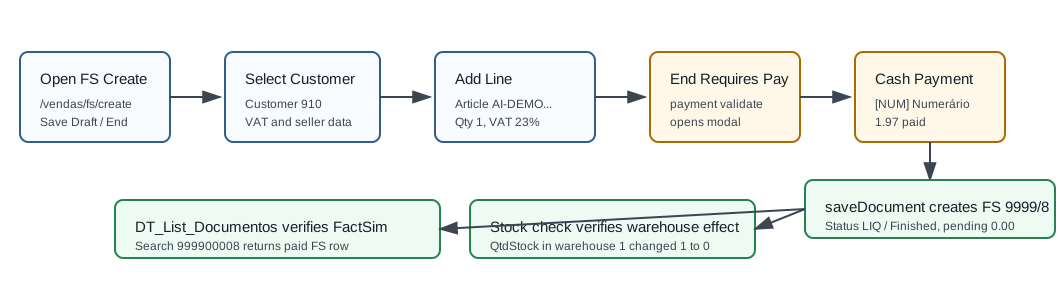
Use Simplified invoice [FS] for a paid point-of-sale style invoice. In the verified demo, FS behaved like a finished fiscal sales document: it required a payment line before save, reduced stock immediately, and finished with paid value equal to the document total.
Step-by-Step
- Open Sales / Simplified invoice [FS], then click Create Invoice Simplified, or navigate directly to
/vendas/fs/create. - Confirm the page title is OG - Simplified invoice [FS]. The screen exposes Save Draft and End.
- In Entity, select the customer. The verified run used customer
910, 100 Ouvidos Lda, VAT509031862. - Review employee, commercial, billing data, payment term, and series. The verified run used employee
Demo, commercialComercial 1, payment termPP, and series9999. - Optionally enter a document Reference. The verified run used
AI-FS-20260519T043414Z. - Open Document / Doc. Lines and add the article. The verified line used article
AI-DEMO-20260519-021105, quantity1, warehouse1, unit price1.60, VAT23%, and total1.97. - Review totals: gross
1.60, VAT0.37, and final total1.97. - Click End. OfficeGest opens the Payment modal if the document has no valid payment line.
- Select [NUM] Numerário. OfficeGest creates a payment row for the full total,
1.97. - Click Save in the payment modal, then confirm Are you sure? with OK.
- OfficeGest posts
saveDocument, redirects to the FS view, and marks the document Finished. The verified save response was999900008%OK&=&OKDOC&=&. - Search the FS list for
999900008or referenceAI-FS-20260519T043414Z. The verified row showed total1.97, paid value1.97, and pending value0.00.
Verified Simplified Invoice Values
| Field | Value |
|---|---|
| Internal number | 999900008 |
| Visible document number | FS 9999/8 |
| Reference | AI-FS-20260519T043414Z |
| Customer | [910] 100 Ouvidos Lda, VAT 509031862 |
| Status | LIQ, visible as Finished |
| Payment | [NUM] Numerário, bank/cash [CXC] Caixa Defeito - Caixa Colaborador Demo, value 1.97. |
| Total | 1.97; paid 1.97; pending 0.00. |
| Stock effect | Warehouse 1 stock for article AI-DEMO-20260519-021105 changed from 1 to 0. |
Backend Calls Observed
| Action or endpoint | Purpose |
|---|---|
DT_List_Documentos&table=FactSim | Loads and verifies simplified invoices with typesaft=FS and tipoop=FS. |
NameEntidades | Loads customer master data for customer 910, including VAT, address, active status, and commercial context. |
DT_Select_AdiantamentosClientes | Checks available customer advance documents before save. |
loadArtigoReducido&compras=F&tipoop=FS | Loads sales article metadata, stock, price, VAT, and cost. |
insertLinhaTabDoc | Inserts the article into temporary sales table 45844. |
listaTabDocumento | Loads simplified-invoice lines before save and on the final view. |
create_document&option=calcular_totais | Calculates gross, VAT, retention, and invoice total. |
checkProfitMargins | Validates margin rules before final save. |
payment&option=validate | Blocks saving when there is no payment line, then validates cash payment with valid:true and troco=0. |
payment&option=add | Adds the NUM payment row for 1.97. |
saveDocument | Creates the finished FS simplified invoice. The verified response was {"return":"999900008%OK&=&OKDOC&=&","print_documents":[]}. |
dt_list_recalc_stock_articles_lojas | Verifies warehouse stock changed after finalization. |
Raw evidence: raw/playwright/workflows/simplified-invoice-fs-20260519T043414Z.json. Screenshots: assets/screenshots/simplified-invoice-fs-20260519T043414Z-01-create-page.png through assets/screenshots/simplified-invoice-fs-20260519T043414Z-04-fs-list.png.
Validation Notes
- Payment is required: calling
sendForm("Guardar")without a payment producedpayment&option=validatewithvalid:"NONE"and a payment modal. - Paid final state: FS saved as
LIQ/ Finished withValorPago=1.97. - Stock is updated immediately: finalizing FS reduced warehouse
1stock from1to0. - Different list table from FT: FS uses
FactSim, notFact, inDT_List_Documentos.