Evidence Summary
- Create route
/compras/ef/create- List route
/compras/ef- Final view
/compras/ef/view/OTk5OTAwMTEx- Workflow run
supplier-order-ef-20260519T040050Z- Created order
999900111 / EF 9999/111- Evidence file
raw/playwright/workflows/latest-supplier-order-ef.json
When to Use This
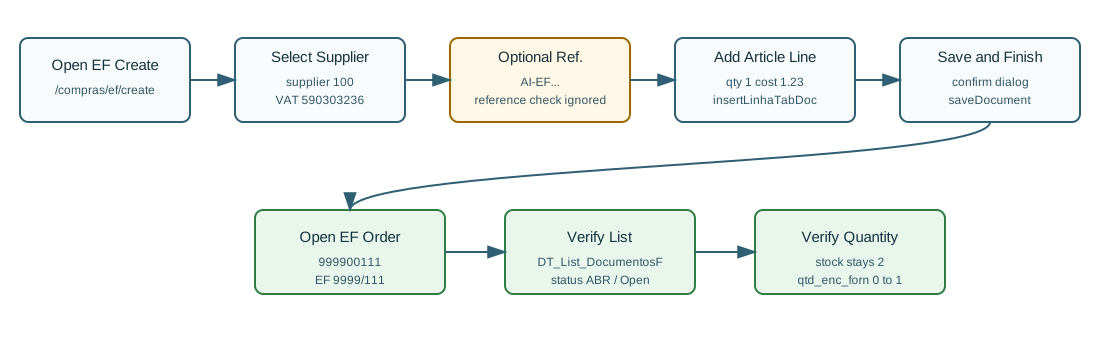
Use Order to Supplier [EF] to place or register an order with a supplier before receiving/invoicing the goods. The verified path creates an open order; it does not require payment and it does not increase physical stock. Instead, OfficeGest increased the supplier-order quantity field for the article.
Step-by-Step
- Open Purchases / Order to Supplier [EF], then click New, or navigate directly to
/compras/ef/create. - Confirm the page title is OG - Order to Supplier [EF] and the action button is Save and Finish.
- Select the Supplier. The verified run used supplier
100, AI Demo Supplier 20260519T030323Z, VAT590303236. - Optionally enter Supplier's N.. The EF page ignores the required supplier-reference check, but the verified run entered
AI-EF-20260519T040050Zfor traceability. - Review dates and defaults. The verified run used emission date
19/05/2026, expected arrival date19/05/2026, series9999, employeeDemo, payment conditionPP, currencyEUR, and warehouse1. - Add the article line. The verified line used article
AI-DEMO-20260519-021105, quantity1, unit cost1.23, VAT23%, and total1.51. - Click Save and Finish.
- Confirm the Are you sure? dialog with OK.
- OfficeGest posts
saveDocument, redirects to the order view, and keeps the order in Open status. The verified save response was999900111%&=&OKDOC&=&. - Search the EF list for
999900111or the supplier reference. The verified list row had statusABR/ Open, total1.51, and paid value0.
Verified Order Values
| Field | Value |
|---|---|
| Internal number | 999900111 |
| Visible document number | EF 9999/111 |
| Supplier reference | AI-EF-20260519T040050Z |
| Supplier | [100] AI Demo Supplier 20260519T030323Z, VAT 590303236 |
| Status | ABR, visible as Open |
| Payment | No payment line; ValorPago=0. |
| Total | 1.51 |
| Stock/order effect | Physical stock in warehouse 1 stayed 2; supplier-order quantity qtd_enc_forn changed from 0 to 1. |
Backend Calls Observed
| Action or endpoint | Purpose |
|---|---|
loadArtigoReducido&compras=T | Loads article metadata for the supplier order line. |
insertLinhaTabDoc | Inserts the article into temporary EF table 45549 with id_tipoop=EF and isforn=T. |
listaTabDocumento | Loads order lines before save and in view mode after save. |
create_document&option=calcular_totais | Calculates net, VAT, and total for the EF order. |
saveDocument | Creates the finished/open supplier order. The verified payload used TipoOp=EF, id=45549, isedit=F, and israsc=0. |
DT_List_DocumentosF | Verifies the order in the EF list using table EncF, actualizacc=F, and tipoop=EF. |
dt_list_recalc_stock_articles_lojas | Verifies that physical stock did not change while supplier-order quantity increased. |
Raw evidence: raw/playwright/workflows/supplier-order-ef-20260519T040050Z.json. Screenshots: assets/screenshots/supplier-order-ef-20260519T040050Z-01-create-page.png through assets/screenshots/supplier-order-ef-20260519T040050Z-04-ef-list.png.
Validation Notes
- No payment modal: unlike CD finalization, EF Save and Finish did not require payment.
- Supplier reference is optional in EF: the page code sets the duplicate/reference check to ignored, but entering a unique value makes the order easier to find later.
- Open state: the verified order saved as
ABR/ Open, notLIQ/ Finished. This matches an order that is waiting for later supplier fulfillment or conversion. - Stock distinction: EF reserved/recorded supplier-order quantity through
qtd_enc_forn; it did not add available physical stock.