Evidence Summary
- Create route
/compras/gtf/create- List route
/compras/gtf- Final view
/compras/gtf/view/OTk5OTAwMDA1- Workflow run
supplier-transport-note-gtf-20260519T082158Z- Created document
999900005 / GTF 9999/5- Evidence file
raw/playwright/workflows/latest-supplier-transport-note-gtf.json
When to Use This
Use Supp. Transportation Note [GTF] to register a supplier-side transportation note with delivery method data. In the verified path the document stayed open and unpaid, used supplier context, and increased warehouse stock for the transported article line.
Step-by-Step
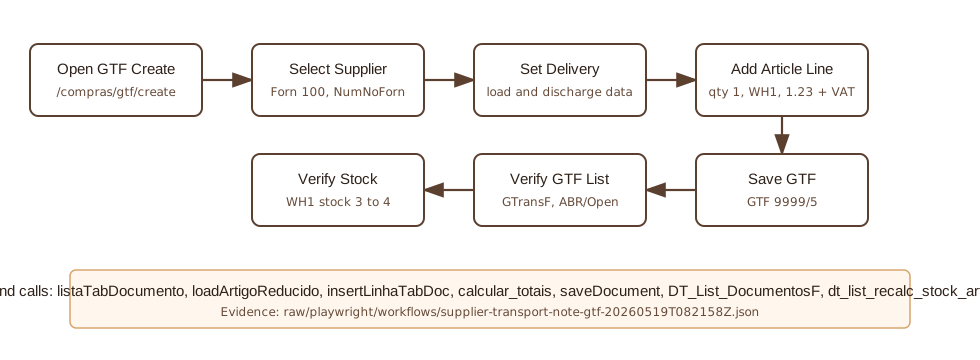
- Open Purchases / Supp. Transportation Note [GTF], then click Create Transport Provider Guide, or navigate directly to
/compras/gtf/create. - Confirm the form is using
TipoOp=GTF. - Select the Supplier. The verified run used supplier
100, AI Demo Supplier 20260519T030323Z, VAT590303236. - Enter a traceable value in Supplier`s N.. The verified run used
AI-GTF-20260519T082158Z. - Review document defaults: series
9999, employeeDemo, payment conditionPP, currencyEUR, and warehouse1. - Fill the delivery-method fields. The verified run used load address
Leiria, load postal code2400, load countryPRT, discharge addressRua Fornecedor Demo 19, discharge localityLeiria, discharge postal code2400-002, and discharge countryPT. - Add the article line. The verified line used article
AI-DEMO-20260519-021105, quantity1, unit cost1.23, VAT23%, and total1.51. - Click Save and Finish.
- Confirm the Are you sure? dialog with OK.
- OfficeGest posts
saveDocument, redirects to the GTF view, and keeps the document in Open status. The verified save response created document999900005. - Search the GTF list for
999900005or the supplier reference. The verified list row had statusABR/ Open, validationN/D, total1.51, and paid value0. - Verify stock if the guide includes stock-moving articles. The verified run changed warehouse
1stock from3to4.
Verified GTF Values
| Field | Value |
|---|---|
| Internal number | 999900005 |
| Visible document number | GTF 9999/5 |
| Supplier reference | AI-GTF-20260519T082158Z |
| Internal reference | AI-GTF-REF-20260519T082158Z |
| Route/list identity | /compras/gtf, table GTransF, tipoop=GTF, tipoterc=F, actualizacc=F, recibo=F. |
| Status | ABR / Open, validation N/D. |
| Total and payment | Total 1.51; no payment line; ValorPago=0. |
| Stock/order effect | Physical stock in warehouse 1 changed from 3 to 4; customer-order quantity stayed 4; supplier-order quantity stayed 2. |
Backend Calls Observed
| Action or endpoint | Purpose |
|---|---|
listaTabDocumento&isforn=T | Loads the temporary supplier line table with tipoop=gtf. |
loadArtigoReducido&compras=T | Loads purchase article metadata, including physical stock 3, customer-order quantity 4, supplier-order quantity 2, cost 1.23, and VAT 23. |
insertLinhaTabDoc | Inserts the article into temporary table 48185 with id_tipoop=GTF, cliente=100, isforn=T, quantity 1, and warehouse 1. |
create_document&option=calcular_totais | Calculates net, VAT, and total for the GTF. |
saveDocument | Creates the open GTF. The verified payload used TipoOp=GTF, NumNoForn=AI-GTF-20260519T082158Z, referencia=AI-GTF-REF-20260519T082158Z, MovimentaStock=1, id=48185, stockneg=NAO USAR, isedit=F, and israsc=0. No CodTipoLanc was present. |
DT_List_DocumentosF | Verifies the document in the GTF list using table GTransF, actualizacc=F, and tipoop=GTF. |
dt_list_recalc_stock_articles_lojas | Verifies warehouse stock after saving the GTF. |
Raw evidence: raw/playwright/workflows/supplier-transport-note-gtf-20260519T082158Z.json. Screenshots: assets/screenshots/supplier-transport-note-gtf-20260519T082158Z-01-create-page.png through assets/screenshots/supplier-transport-note-gtf-20260519T082158Z-04-gtf-list.png.