Evidence Summary
- Create route
/vendas/gt/create- List route
/vendas/gt- Final view
/vendas/gt/view/OTk5OTAwMDg5- Workflow run
transportation-note-gt-20260519T052242Z- Created document
999900089 / GT 9999/89- Evidence file
raw/playwright/workflows/latest-transportation-note-gt.json
When to Use This
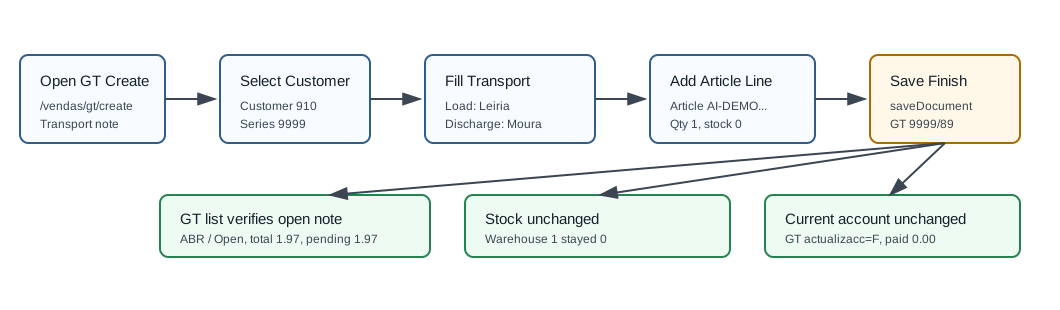
Use Transportation Note [GT] when you need a transport document for goods movement without creating an invoice, receipt, or customer current-account entry. In the verified demo, GT could be created even when physical stock for the line article was already 0, and it did not change stock.
Step-by-Step
- Open Sales / Shipping / Transportation Note [GT], then click Create Transportation Guide, or navigate directly to
/vendas/gt/create. - Select the customer. The verified run used customer
910, 100 Ouvidos Lda, VAT509031862. - Open the Delivery Method tab and confirm load and discharge information. The verified run used load location
Leiriaand discharge at the customer's Moura address. - Confirm document series, employee, commercial, and payment term. The verified run used series
9999, employeeDemo, commercialComercial 1, and payment termPP. - Optionally enter a Reference. The verified run used
AI-GT-20260519T052242Z. - Add the article line. The verified run inserted article
AI-DEMO-20260519-021105, quantity1, warehouse1, unit price about1.60, VAT23%, and total1.97. - Click Save and Finish, then confirm the Are you sure? dialog if shown.
- OfficeGest posts
saveDocument, redirects to the GT view, and creates an open transportation note. The verified save response was999900089%OK&=&OKDOC&=&. - Search the GT list for
999900089. The verified row showed statusABR/ Open, total1.97, paid0.00, pending1.97, and payment term Pronto Pagamento. - Check stock if the document is expected to affect inventory. The verified GT left warehouse
1stock unchanged at0.
Verified Transportation Note Values
| Field | Value |
|---|---|
| Internal number | 999900089 |
| Visible document number | GT 9999/89 |
| Customer | [910] 100 Ouvidos Lda, VAT 509031862 |
| Load location | Leiria, postal code 2400, country PRT |
| Discharge location | Rua Engenheiro Armando Almeida Mansos 33 Moura, Moura, postal code 7860-004, country PRT |
| Line | Article AI-DEMO-20260519-021105, quantity 1, warehouse 1, VAT 23%. |
| Status | ABR, visible as Open; validation N/D. |
| Total | 1.97; paid 0.00; pending 1.97. |
| Stock effect | Warehouse 1 stock stayed 0; customer-order and supplier-order quantities stayed at 1. |
Backend Calls Observed
| Action or endpoint | Purpose |
|---|---|
DT_List_Documentos&table=GTrans | Loads and verifies transportation notes with typesaft=GT, tipoop=GT, and actualizacc=F. |
NameEntidades | Loads customer master data for customer 910. |
listaTabDocumento | Loads document lines for the temporary document id before and after save. |
loadArtigoReducido / insertLinhaTabDoc | Loads the article and inserts the GT line into the temporary document table. The article lookup used actualizastocks=F and returned stock 0. |
create_document&option=calcular_totais | Calculates gross, VAT, retention, and total. |
saveDocument | Creates the GT document. The verified response was {"return":"999900089%OK&=&OKDOC&=&","print_documents":[]}. |
dt_list_recalc_stock_articles_lojas | Confirms warehouse stock after final save. Warehouse 1 stayed 0. |
Raw evidence: raw/playwright/workflows/transportation-note-gt-20260519T052242Z.json. Screenshots: assets/screenshots/transportation-note-gt-20260519T052242Z-01-create-page.png through assets/screenshots/transportation-note-gt-20260519T052242Z-04-gt-list.png.