Evidence Summary
- Workflow run
crm-communication-delete-all-contacts-20260519T111724Z- Communication
39- Selected contact
1240/comercial@guisoft.net- Deleted list row
1174- Delete-all request
communications/deletelines
Before You Start
- Open the target communication detail page and switch to List Comunication.
- Use this only when every current recipient line should be removed from the communication.
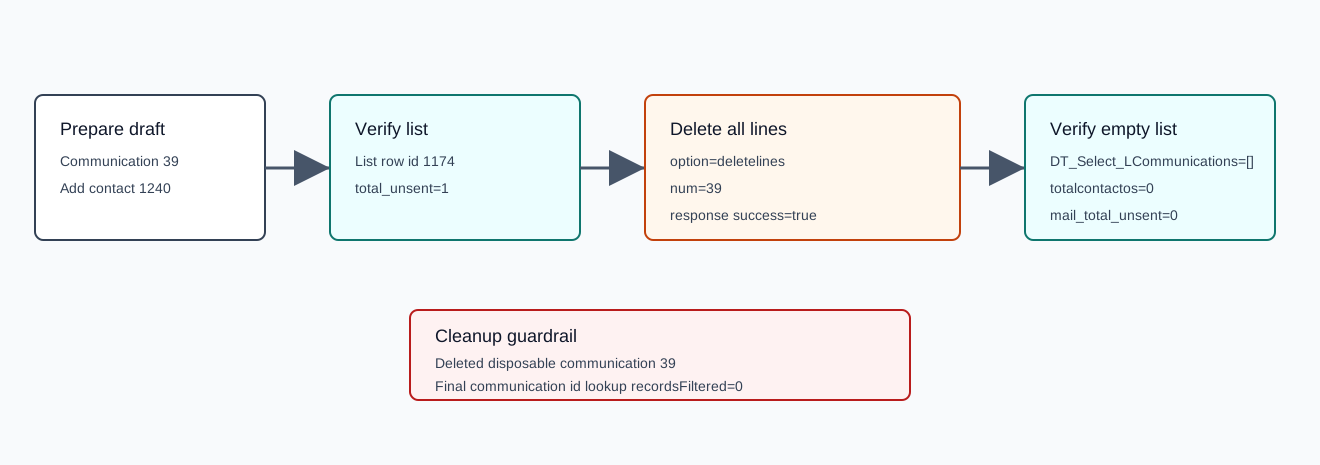
- The verified setup had one unsent recipient row:
1174, addresscomercial@guisoft.net, typeemail, statusF/ Not Sent. - This workflow only clears communication recipient lines. It does not send, send a test email, schedule, duplicate, upload documents, or touch stock.
Delete All Recipient Lines
- Open the communication detail page.
- Confirm the recipient list contains only lines that should be removed.
- Use the list-level delete-all-lines action.
- Wait for the recipient list, contact summary, and counters to refresh.
Verified Request
| Field | Verified value | Meaning |
|---|---|---|
endpoint | POST /ajaxserver | Central AJAX endpoint. |
action | communications | CRM communication action namespace. |
option | deletelines | Deletes all recipient/list rows for the communication. |
num | 39 | Parent communication id. |
status | 200 | The request completed successfully. |
response | {"success":true} | The backend confirmed the delete-all action. |
Confirm the Empty List
- Refresh the List Comunication table.
- Confirm
DT_Select_LCommunicationsreturns an emptydataarray. - Confirm the communication contact summary and counters are zero.
The verified post-delete lookup returned no recipient rows. The communication row returned totalcontactos=0, resumocontactos=0, total_sent=0, total_unsent=0, and status=RDY. getCountersCommunication returned mail_total_unsent=0, mail_total_sent=0, and mail_total_error=0.
Cleanup Used in Probe
The verification run deleted disposable communication 39 with communications / DELETE_communication. The final communication id lookup returned recordsFiltered=0.
Artifacts
raw/playwright/workflows/crm-communication-delete-all-contacts-20260519T111724Z.jsonassets/screenshots/crm-communication-delete-all-contacts-20260519T111724Z-01-before-add.pngassets/screenshots/crm-communication-delete-all-contacts-20260519T111724Z-02-after-add.pngassets/screenshots/crm-communication-delete-all-contacts-20260519T111724Z-03-after-delete-all.pngassets/screenshots/crm-communication-delete-all-contacts-20260519T111724Z-04-after-cleanup.png