Evidence Summary
- Workflow run
crm-communication-delete-20260519T103942Z- Deleted communication
39- Description
AI Demo CRM Communication 20260519T103424Z- Delete request
communications/DELETE_communication- Final lookup
recordsFiltered=0
Before You Start
- Open CRM then Operations then Comunications, or navigate to
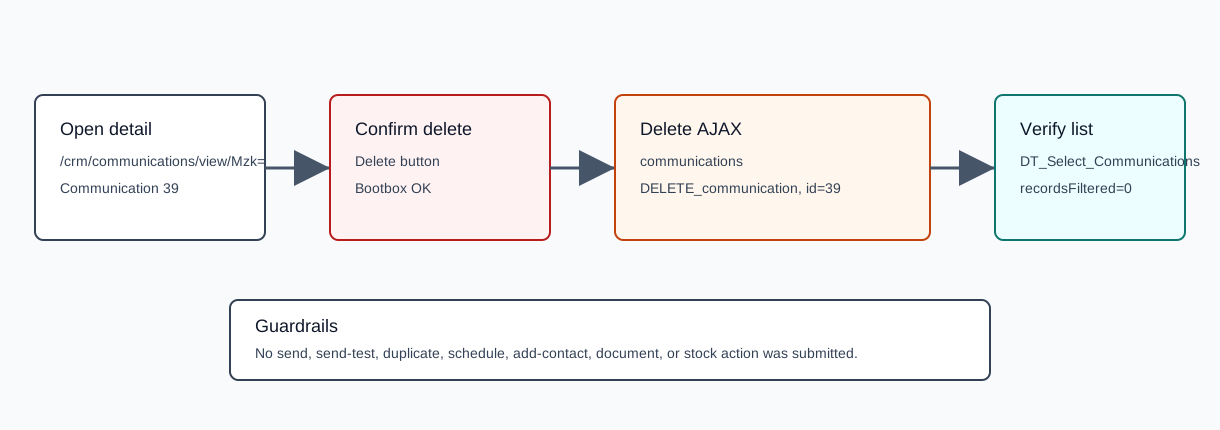
/crm/communications. - Search for and open the communication detail page. The verified route was
/crm/communications/view/Mzk=, whereMzk=is the encoded id for communication39. - This workflow deletes the communication record. The verified run did not use send, send-test, duplicate, schedule, add-contact, document, or stock actions.
Delete the Communication
- Review the communication header and content to confirm you are on the intended record.
- Click Delete in the action bar.
- Review the confirmation dialog. The verified text was
Are you sure you want to delete?with Cancel and OK. - Click OK.
- Confirm the browser redirects away from the detail page. The verified redirect was to
/crm/painelresumo/.
Verified Request
| Field | Verified value | Meaning |
|---|---|---|
endpoint | GET /ajaxserver | Central AJAX endpoint. |
action | communications | Communication module action group. |
option | DELETE_communication | Deletes a communication record. |
id | 39 | Communication id. |
status | 200 | The AJAX request completed successfully; the captured response body was empty. |
Confirm Deletion
- Return to
/crm/communications. - Search for the deleted description.
- Confirm the communications table returns no matching rows.
The verified post-delete lookup for AI Demo CRM Communication 20260519T103424Z returned recordsTotal=37, recordsFiltered=0, and an empty row list.
Artifacts
raw/playwright/workflows/crm-communication-delete-20260519T103942Z.jsonassets/screenshots/crm-communication-delete-20260519T103942Z-01-communication-detail-before-delete.pngassets/screenshots/crm-communication-delete-20260519T103942Z-02-delete-confirmation.pngassets/screenshots/crm-communication-delete-20260519T103942Z-03-after-delete.png