Evidence Summary
- Route
/vendas/fr/create- Customer
[910] 100 Ouvidos Lda- Article
AI-DEMO-20260519-021105- Evidence file
raw/playwright/workflows/latest-invoice-receipt-delete-payment-row.json
When to Use This
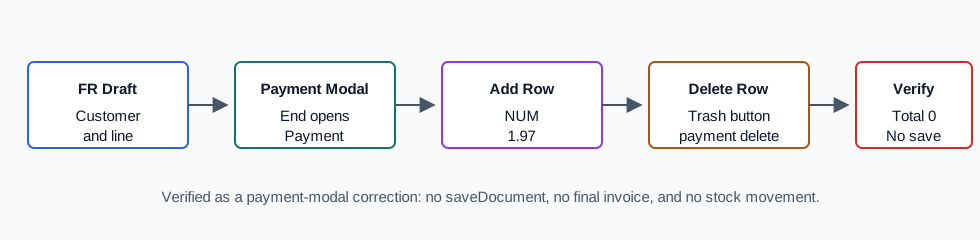
Use this when the Payment modal has a wrong payment method, wrong amount, wrong inbox/cash box, or duplicate payment row before the invoice / receipt is saved. Deleting the row returns the payment modal to an unpaid state; you can then add the correct payment method or cancel the modal.
Step-by-Step
- Create or open the Invoice / Receipt [FR] draft and add the customer and document lines.
- Click End to open the Payment modal.
- Add a payment method if one is not already present. The verified run added [NUM] Numerario for
1.97. - Find the payment row you want to remove.
- Click the red trash button on that payment row.
- Confirm that the payment row disappears from the modal.
- Confirm that the modal Total returns to
0when no payment rows remain. - Add the correct payment row, or cancel the payment modal if you are not ready to save.
Verified Behavior
| Check | Observed result |
|---|---|
| Payment row before delete | payment&option=add created a NUM row with value 1.97, inbox [0] Caixa 0, estimated date 19/05/2026, and one red delete_payment button. |
| Delete action | Clicking the row trash button submitted payment&option=delete with the temporary document id, nseq=1, and total 1.97. |
| Payment modal after delete | #payment_form became empty, no .payment_form inputs remained, no .delete_payment buttons remained, and #payment_total became 0. |
| Save boundary | No saveDocument request and no OKDOC response were captured. |
| Stock boundary | The article stock value was unchanged before and after the payment-row deletion because the FR was not finalized. |
Backend Calls Observed
| Action or endpoint | Purpose |
|---|---|
payment&option=validate | Opens or validates the payment modal before final save. |
payment&option=add | Adds a payment method row to the modal. |
payment&option=delete | Deletes one payment row by sequence number and refreshes the modal HTML. |
Raw evidence: raw/playwright/workflows/invoice-receipt-delete-payment-row-20260519T222826Z.json. Screenshots: assets/screenshots/invoice-receipt-delete-payment-row-20260519T222826Z-01-fr-line-before-payment.png through assets/screenshots/invoice-receipt-delete-payment-row-20260519T222826Z-03-payment-row-deleted.png.