Evidence Summary
- Source invoice
999901699 / FT 9999/1699- Customer
910 / 100 Ouvidos Lda- Route
/vendas/ft/view/OTk5OTAxNjk5- Evidence file
raw/playwright/workflows/latest-sales-invoice-download-attachment.json
When to Use This
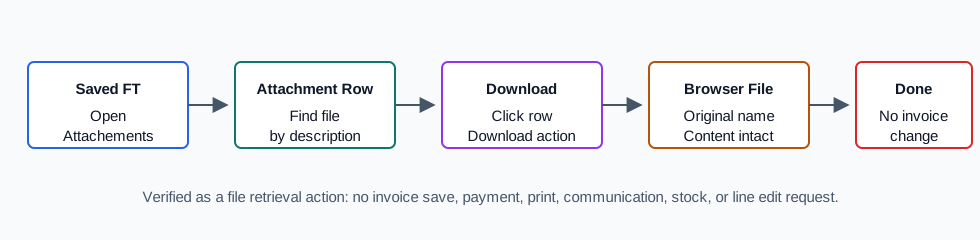
Use this when a supporting file is already attached to a saved invoice and you need to retrieve it. The row download action retrieves the uploaded file; it does not print the invoice, generate a PDF, send a message, edit metadata, or change the invoice.
Step-by-Step
- Open the saved sales invoice view. The verified run used
/vendas/ft/view/OTk5OTAxNjk5. - Open the Attachements tab.
- Find the attachment row by Description, File Name, Type, or Date.
- Click the row's Download action.
- Allow the browser download to complete.
- Check that the downloaded filename matches the row's original File Name.
Verified Behavior
| Check | Observed result |
|---|---|
| Download action | The row action called lista_attachments_edit(193) and triggered a browser download. |
| Filename | The browser suggested the original filename sales-invoice-download-attachment-20260519T222253Z.txt. |
| File content | The downloaded text file content matched the uploaded file exactly. |
| Attachment row | The row belonged to numdoc=999901699 and tipodoc=FT, with MIME type text/plain. |
| Cleanup | The disposable attachment was deleted after verification; the final lookup found zero rows for that attachment id. |
| Safety boundary | No invoice save, payment, print, communication, stock, metadata edit, or line-edit request was submitted. |
Backend Calls Observed
| Action or endpoint | Purpose |
|---|---|
DT_Select_Attachments | Loads the saved FT attachment row before and after download. |
lista_attachments_edit({id}) | Row download action that starts the browser file download. |
deleteAttachmentById | Cleanup endpoint used after the verified download so the demo invoice was left without the disposable attachment. |
Raw evidence: raw/playwright/workflows/sales-invoice-download-attachment-20260519T222253Z.json. Download artifact: raw/playwright/downloads/sales-invoice-download-attachment-20260519T222253Z-sales-invoice-download-attachment-20260519T222253Z.txt. Screenshots: assets/screenshots/sales-invoice-download-attachment-20260519T222253Z-01-attachments-tab.png through assets/screenshots/sales-invoice-download-attachment-20260519T222253Z-04-after-delete.png.