Evidence Summary
- Workflow run
crm-communication-edit-20260519T105353Z- Edited communication
39- Description
AI Demo CRM Communication 20260519T105105Z- Save request
communications/postEditComm- Edited subject
AI Demo edited communication subject 20260519T105353Z
Before You Start
- Open CRM then Operations then Comunications, or navigate to
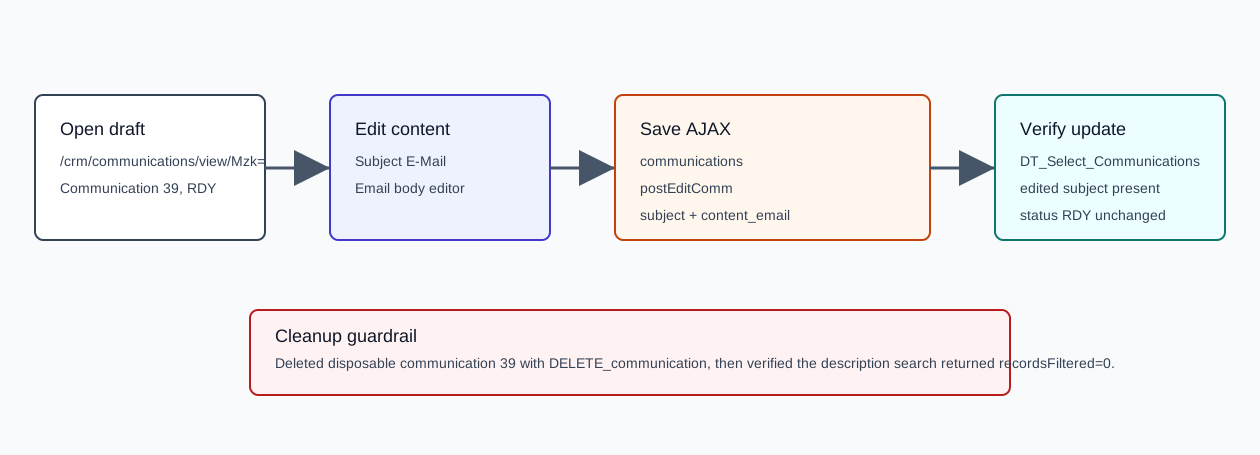
/crm/communications. - Search for and open the communication detail page. The verified route was
/crm/communications/view/Mzk=, whereMzk=is the encoded id for communication39. - This workflow saves draft email content only. It does not schedule, send, send a test email, add contacts, duplicate, upload documents, or touch stock.
Edit and Save
- Open the Email Content tab on the communication detail page.
- Edit Subject E-Mail. The verified value was
AI Demo edited communication subject 20260519T105353Z. - Edit the email body. The verified body was
<p>AI verified edited CRM communication body 20260519T105353Z</p>. - Click Save. Do not click Schedule, which uses a separate send/schedule path.
Verified Request
| Field | Verified value | Meaning |
|---|---|---|
endpoint | POST /ajaxserver | Central AJAX endpoint. |
action | communications | Communication module action group. |
option | postEditComm | Saves communication draft edits. |
id | 39 | Communication id. |
email | 1 | Email channel remained enabled. |
subject | AI Demo edited communication subject 20260519T105353Z | Saved email subject. |
content_email | <p>AI verified edited CRM communication body 20260519T105353Z</p> | Saved email body HTML. |
Attachments | empty | No attachment was added. |
status | 200 | The AJAX request completed successfully; the captured response body was empty. |
Confirm the Edit
- After saving, confirm the browser remains on the communication detail page.
- Search the communications list by id.
- Verify the row keeps
status=RDY,email=1,sms=0,totalcontactos=0,total_sent=0, andtotal_unsent=0. - Verify the row subject equals the edited subject.
The verified lookup returned communication 39 with subject AI Demo edited communication subject 20260519T105353Z.
Cleanup Used in Probe
The verification run deleted the disposable communication with communications / DELETE_communication. The delete call returned HTTP 200 with body true, and the final description search returned recordsFiltered=0.
Artifacts
raw/playwright/workflows/crm-communication-edit-20260519T105353Z.jsonassets/screenshots/crm-communication-edit-20260519T105353Z-01-before-edit.pngassets/screenshots/crm-communication-edit-20260519T105353Z-02-edited-before-save.pngassets/screenshots/crm-communication-edit-20260519T105353Z-03-after-save.pngassets/screenshots/crm-communication-edit-20260519T105353Z-04-after-cleanup.png