Evidence Summary
- Workflow run
crm-opportunity-edit-20260519T123004Z- Opportunity code
2605-0001- Edited description
AI Demo CRM Opportunity Edited 20260519T123004Z- Edited value/probability
345.67/45%- Final state
- Deleted and absent from
DT_ListaOportNeg
Edit Main Data
- Open the opportunity detail route from
/crm/oportunidadesnegocios. - Edit fields in Data business opportunity, including description, commercial, business area, third party, contact, campaign, closing date, source, value estimate, probability, and observations.
- Click the page-level Save button.
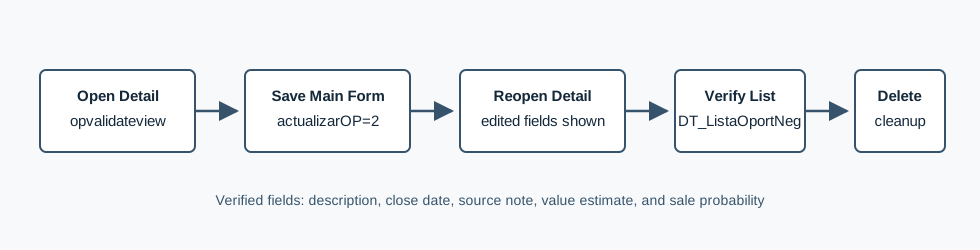
The verified detail form is opvalidateview. OfficeGest posts the form back to the same detail route with actualizarOP=2. The verified request updated Designacao, DataFechoPrev=20/06/2026, ValorEstimado=345.67, ProbabilVenda=45, and ObsOri=AI verified CRM opportunity edited source. The HTML response contained the edited description.
Verify the Edit
The verified workflow reopened /crm/oportunidadesnegocios/view/MjYwNS0wMDAx and confirmed the edited description, close date, value estimate, probability, and source note. It then queried DT_ListaOportNeg with the edited description and found row 2605-0001 returning ValorEstimado=345.67, ProbabilVenda=45, and close date 2026-06-20.
Related Detail Actions
The same detail page exposes separate mechanisms for observations and phase changes. The observation card uses UpdateOporNeg with campo=Obs. The Change phase / data modal uses action=oportneg, option=update_fase, and a serialized editafase form. Those actions were identified during the edit probe, but the verified run only exercised the main form save path.
Artifacts
raw/playwright/workflows/crm-opportunity-edit-20260519T123004Z.jsonassets/screenshots/crm-opportunity-edit-20260519T123004Z-01-list-before-create.pngassets/screenshots/crm-opportunity-edit-20260519T123004Z-02-detail-before-edit.pngassets/screenshots/crm-opportunity-edit-20260519T123004Z-03-detail-after-edit.pngassets/screenshots/crm-opportunity-edit-20260519T123004Z-04-list-after-delete.png