Evidence Summary
- Workflow run
ticket-forward-20260519T140434Z- Ticket id
190/SUP-2605-52235- Post id
217- Test recipient
aiticket-forward@example.invalid- Final state
- Forward attempts rejected by validation; disposable ticket marked as trash.
Forward the Whole Ticket
- Open a ticket detail page.
- Open Operations.
- Choose Forward.
- Enter a recipient email address and submit.
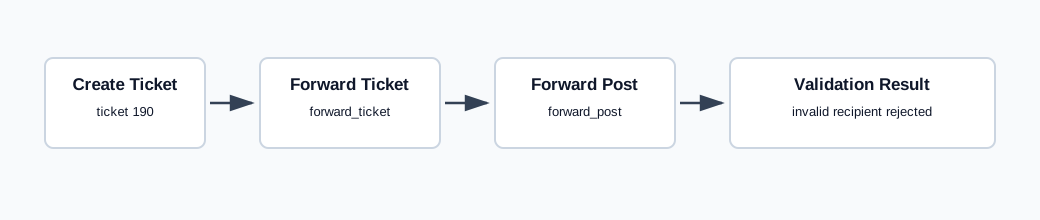
The endpoint is tickets / forward_ticket with ticket_id, email_dst, and dst_name. The controlled run used ticket_id=190, email_dst=aiticket-forward@example.invalid, and empty dst_name. OfficeGest returned {"success":false,"message":"Invalid Email"}.
Forward One Post
- Open the ticket detail page.
- Find the message/post to forward.
- Click the post-level Forward action.
- Enter a recipient email address and submit.
The endpoint is tickets / forward_post with post_id, email_dst, ticket_id, and dst_name. The controlled run used post_id=217 and returned {"success":false,"values":{"ticket_id":190}} for the invalid test recipient.
Artifacts
raw/playwright/workflows/ticket-forward-20260519T140434Z.jsonassets/screenshots/ticket-forward-20260519T140434Z-01-new-ticket-form.pngassets/screenshots/ticket-forward-20260519T140434Z-02-detail-after-create.pngassets/screenshots/ticket-forward-20260519T140434Z-03-detail-after-forward.pngassets/screenshots/ticket-forward-20260519T140434Z-04-detail-after-trash.png