Evidence Summary
- Route
/vendas/fr/create- Inactive customer
[1] Consumidor Final, VAT999999990,activo:"F"- Article line
AI-DEMO-20260519-021105, quantity1, total1.97- Evidence file
raw/playwright/workflows/latest-invoice-receipt-inactive-customer-validation.json
What It Means
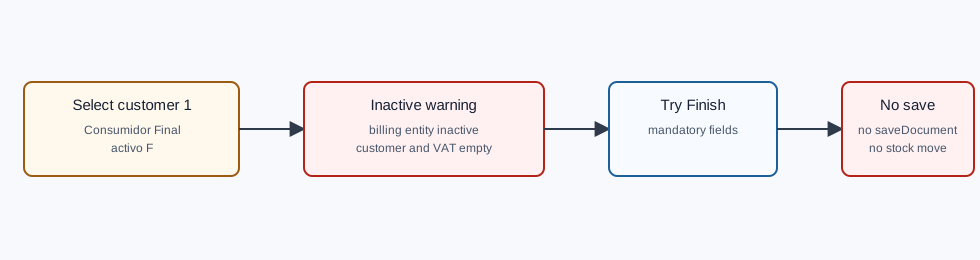
An inactive billing entity cannot be used to finish an invoice / receipt. In the verified run, OfficeGest showed Inactive billing entity! The billing entity is inactive. as soon as customer 1 was selected, then left the billing customer and VAT fields empty. When the document was later finished, OfficeGest showed Error There are mandatory fields unfilled and did not save.
How to Fix It
- Return to the Vehicle & Entity tab.
- Clear the inactive billing entity if it is still displayed.
- Select an active Fact entity. The verified successful FR path used
[910] 100 Ouvidos Lda. - Confirm that VAT, billing name, address, country, commercial, and employee fields are populated.
- Keep the article lines already added, or add them if the line table is empty.
- Click End again. For an FR, continue through the Payment modal and add a payment line before saving.
Verified Behavior
| Check | Observed result |
|---|---|
| Customer lookup | NameEntidades returned customer 1 with activo:"F". |
| Selection warning | Visible toast: Inactive billing entity! The billing entity is inactive. |
| Field state after selection | #doc_CodTerc and #doc_NContrib were empty, while the billing name displayed Consumidor Final. |
| Finish attempt | Visible toast: Error There are mandatory fields unfilled. |
| Final save request | No saveDocument request was submitted. |
| Stock effect | Warehouse 1 stock stayed at -3 because the document was not finalized. |
Raw evidence: raw/playwright/workflows/invoice-receipt-inactive-customer-validation-20260519T185928Z.json. Screenshots: assets/screenshots/invoice-receipt-inactive-customer-validation-20260519T185928Z-01-fr-line-inactive-customer.png and assets/screenshots/invoice-receipt-inactive-customer-validation-20260519T185928Z-02-inactive-customer-error.png.