Evidence Summary
- Route
/vendas/r/create- Customer
[910] 100 Ouvidos Lda- Receipt state
- No documents selected in the Documents / DocsAPagar grid
- Evidence file
raw/playwright/workflows/latest-receipt-no-documents-validation.json
What It Means
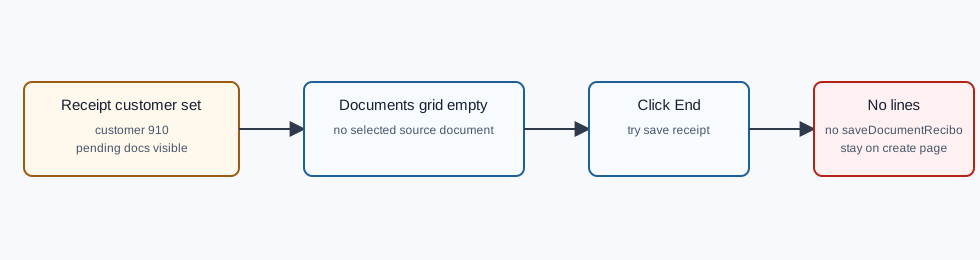
A receipt is not created from article lines. It must contain at least one pending customer document moved into the Documents grid. If the customer is selected but no document is selected for settlement, OfficeGest blocks the save with ErrorNo lines.
How to Fix It
- Stay on the receipt create page after the error.
- Confirm the correct customer is selected in Customer.
- Look at Outstanding documents for unpaid invoices or other pending documents.
- Select the source document to settle. In verified receipt flows, this calls
changeEstadoReciboand moves the row into Documents. - Confirm Documents contains the expected document and the value to pay is correct.
- Add the payment method and amount.
- Click End again and confirm the save dialog.
Verified Behavior
| Check | Observed result |
|---|---|
| Before save | Customer 910 selected; Documents grid had zero rows. |
| Visible validation | Toast showed ErrorNo lines. |
| Navigation | OfficeGest stayed on /vendas/r/create. |
| Final save request | No saveDocumentRecibo request was submitted. |
| Correct next action | Move at least one pending document into Documents, then add payment and save. |
Raw evidence: raw/playwright/workflows/receipt-no-documents-validation-20260519T191736Z.json. Screenshots: assets/screenshots/receipt-no-documents-validation-20260519T191736Z-01-customer-no-documents-selected.png and assets/screenshots/receipt-no-documents-validation-20260519T191736Z-02-no-documents-validation.png.