Evidence Summary
- Workflow run
ticket-merge-20260519T135959Z- Primary ticket
188/SUP-2605-58575- Secondary ticket
189- Final state
- Primary ticket kept and trashed after verification; secondary ticket URL no longer resolved after merge.
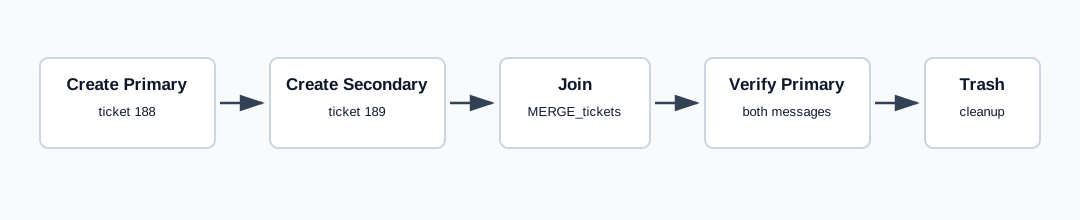
Join Selected Tickets
- Open Tickets then Tickets.
- Select at least two ticket rows.
- Click Join.
- Confirm the prompt. OfficeGest warns that the action cannot be undone.
The verified endpoint was tickets / MERGE_tickets, posted as list[]=188 and list[]=189. The response returned {"success":true,"message":""}.
Observed Result
The first selected ticket was the surviving ticket. After merge, ticket 188 kept subject AI Demo Ticket Merge Primary 20260519T135959Z and its detail contained both the primary message and the secondary message AI verified ticket merge secondary workflow. Opening ticket 189 after merge showed The specified file was not found.
Cleanup used UPDATE_ticket with data[is_trash]=1. Ticket 188 returned normal ticket metadata; ticket 189 returned {"success":true,"id":"189","ticket":null}, consistent with the secondary record being absorbed by the merge.
Artifacts
raw/playwright/workflows/ticket-merge-20260519T135959Z.jsonassets/screenshots/ticket-merge-20260519T135959Z-01-new-ticket-form.pngassets/screenshots/ticket-merge-20260519T135959Z-02-primary-detail-after-create.pngassets/screenshots/ticket-merge-20260519T135959Z-03-secondary-detail-after-create.pngassets/screenshots/ticket-merge-20260519T135959Z-04-primary-detail-after-merge.pngassets/screenshots/ticket-merge-20260519T135959Z-05-secondary-detail-after-merge.pngassets/screenshots/ticket-merge-20260519T135959Z-06-primary-detail-after-trash.png