Evidence Summary
- Workflow run
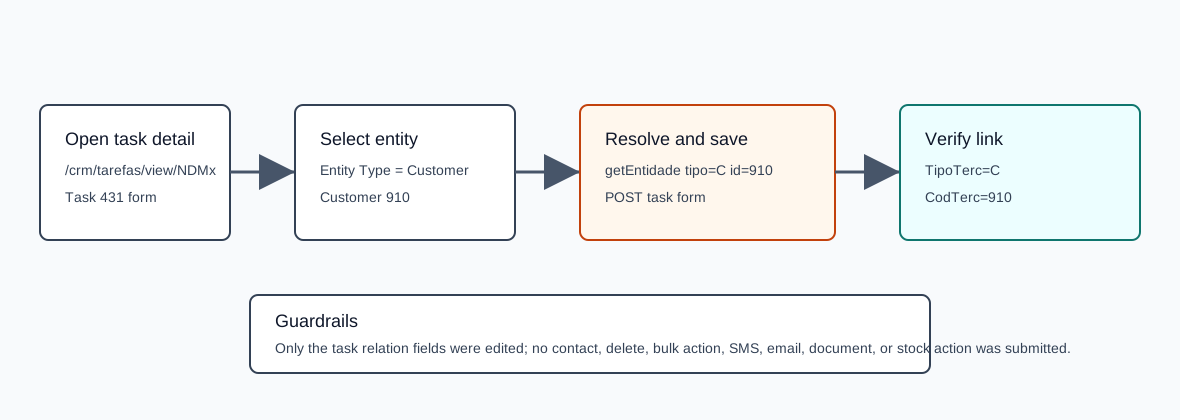
crm-task-entity-20260519T100919Z- Updated task
431- Linked entity
- Customer
910,100 Ouvidos Lda - Final state
TipoTerc=CandCodTerc=910
Before You Start
- Open CRM then Operations then Tasks, or navigate to
/crm/tarefas. - Search for the task and open its detail page.
- The entity area supports Customer, Prospect, Supplier, Collaborator, and Business records.
Link an Entity
- Open the task detail page.
- In Entity Type, choose the type of record you want to link. The verified workflow used Customer, stored as
C. - Use the entity selector to search and select the record. The verified workflow selected customer
910,100 Ouvidos Lda. - Confirm the read-only entity fields fill in, including name, VAT number, location, zip code, phone, and mobile when available.
- Optionally select a contact when the entity type supports contacts. The verified workflow did not link a contact.
- Click Save.
Verified Selectors and Payload
The entity selector changes its source table based on tipoterc. Customer uses table clientes and id field codterc.
| Field or call | Verified value | Meaning |
|---|---|---|
Entity Type | C | Customer. |
Sel2_Select | table=clientes, id=codterc, term=910 | Initializes the selected customer row. |
getEntidade | tipo=C, id=910 | Loads the entity summary fields shown on the task page. |
tipoterc | C | Saved entity type. |
codterc | 910 | Saved customer id. |
codcontacto | empty | No contact was linked in the verified run. |
POST endpoint | /crm/tarefas/view/NDMx | Same task detail save endpoint used by task edit workflows. |
Confirm the Link
- Reload the task detail page and confirm the entity fields still show the selected record.
- Search the task list by subject and confirm the task row reports the expected entity type and id.
The verified detail reload showed terc_Tipo=C, terc_ID=910, and terc_Nome=100 Ouvidos Lda. The verified dt_tarefas row returned TipoTerc=C and CodTerc=910.
Artifacts
raw/playwright/workflows/crm-task-entity-20260519T100919Z.jsonassets/screenshots/crm-task-entity-20260519T100919Z-01-task-detail-before-entity.pngassets/screenshots/crm-task-entity-20260519T100919Z-02-task-detail-entity-filled.pngassets/screenshots/crm-task-entity-20260519T100919Z-03-task-detail-after-save.png