Evidence Summary
- Source invoice
999901699 / FT 9999/1699- Customer
910 / 100 Ouvidos Lda- Route
/vendas/ft/view/OTk5OTAxNjk5- Evidence file
raw/playwright/workflows/latest-sales-invoice-attachments.json
When to Use This
Use this after an invoice is already saved and you need to store supporting files against the document, such as signed copies, proof of delivery, internal evidence, or customer-supplied documents. The attachment action is on the saved invoice view; it does not change invoice totals, customer, lines, stock, payment, print state, or communication state.
Step-by-Step
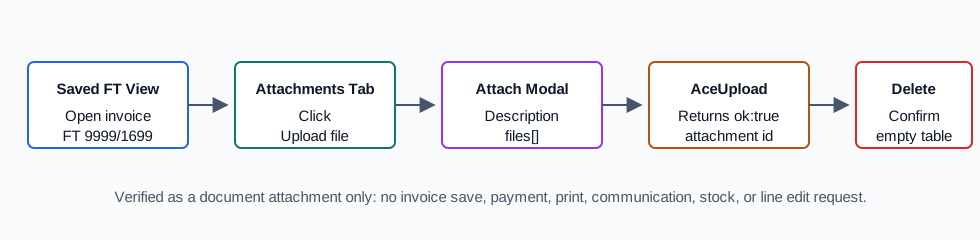
- Open the saved sales invoice view. The verified run used
/vendas/ft/view/OTk5OTAxNjk5. - Open the Attachements tab.
- Click Upload file.
- In the Attach modal, enter a required Description.
- Choose an optional category if your company uses attachment categories.
- Leave Public checked if the file should be public; uncheck it for internal-only evidence.
- Choose the file in the
files[]field or drop it in the file area. - Click Upload file.
- Confirm the attachment table shows the description, date, original file name, MIME type, size, public flag, and action buttons.
- To remove an attachment, click the row's trash action and confirm OK in the delete prompt.
Verified Behavior
| Check | Observed result |
|---|---|
| Tab and table | The saved FT view exposed Attachements 0, Upload file, and table columns Description, Category, Date, File Name, Type, Size, and Public. |
| Document binding | The modal posted action=AceUpload with location=attachments, codempr=1, codterc=910, tipoterc=C, numdoc=999901699, and tipodoc=FT. |
| Required fields | #novoattachment_assunto was required; #novoattachment_categoria was optional; #novoattachment_public defaulted checked; the file field was files[]. |
| Upload response | POST /ajaxserver returned {"ok":true,"num":193} with the stored generated filename, MIME type text/plain, size 66, and upload path. |
| Attachment list | DT_Select_Attachments used search[NumDoc]=999901699 and search[tipodoc]=FT. After upload, the row showed the verified description, original file name, text/plain, file size, public check, and Download/Edit/Delete row actions. |
| Delete | The row delete action opened Are you sure you want to delete?; after confirming OK, the attachment table returned No data available in table. |
| Safety boundary | No invoice save, payment, print, communication, stock, or line-edit request was submitted. |
Backend Calls Observed
| Action or endpoint | Purpose |
|---|---|
DT_Select_Attachments | Loads attachment rows for the saved invoice using search[NumDoc] and search[tipodoc]. |
AceUpload | Uploads the selected file and stores the attachment metadata against the FT document. |
lista_attachments_delete({id}) | Opens the row delete confirmation and removes the attachment after confirmation. |
Raw evidence: raw/playwright/workflows/sales-invoice-attachments-20260519T221119Z.json. Screenshots: assets/screenshots/sales-invoice-attachments-20260519T221119Z-01-attachments-tab.png through assets/screenshots/sales-invoice-attachments-20260519T221119Z-04-after-delete.png.