Evidence Summary
- Workflow run
ticket-departments-crud-20260519T143230Z- Route
/tickets/apoio/departments- Create route
/tickets/apoio/departments/new- Department id
6- Final state
- Disposable department deleted and absent from
DT_Select_tickets_departments.
Create or Edit
- Open Tickets, Support Files, then Departments.
- Click Add to open
/tickets/apoio/departments/new. - Fill required Name.
- Select State to Re-Open. The verified disposable row used status id
1. - Optionally select the department email account, SLA, label format, notification alerts, automatic closing status/days, and rich-text signature.
- Enable Active if the department should be available to tickets.
- Click Guardar.
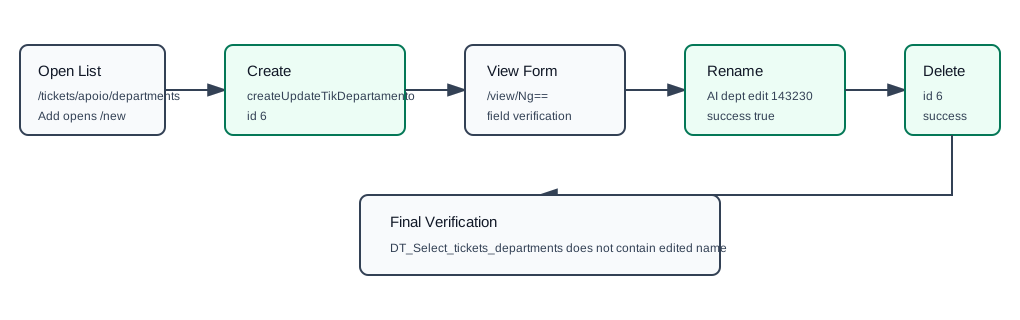
Create and update both submit createUpdateTikDepartamento with the serialized department form. The verified create used department_name=AI dept 143230, empty email/SLA/tag/signature values, department_status_reopen=1, and department_active=1. It returned {"success":true,"id":6}.
Edit opens /tickets/apoio/departments/view/Ng== for department 6. The verified update submitted department_id=6 and department_name=AI dept edit 143230, returning {"success":true,"id":"6"}.
Delete
- Return to Tickets, Support Files, Departments.
- Click the delete action on the department row.
- Confirm the prompt.
Delete calls deleteTikDepartment with id=6. The response returned {"success":true}. A final DT_Select_tickets_departments call confirmed AI dept edit 143230 no longer existed.
Artifacts
raw/playwright/workflows/ticket-departments-crud-20260519T143230Z.jsonraw/playwright/workflows/ticket-departments-source-20260519T143000Z.txtraw/playwright/workflows/ticket-departments-new-source-20260519T143100Z.txtassets/screenshots/ticket-departments-crud-20260519T143230Z-01-departments-list.pngassets/screenshots/ticket-departments-crud-20260519T143230Z-02-department-view-created.pngassets/screenshots/ticket-departments-crud-20260519T143230Z-03-departments-after-delete.png