Evidence Summary
- Workflow run
ticket-priorities-crud-20260519T142035Z- Route
/tickets/apoio/priorities- Priority id
5- Final state
- Disposable priority deleted and absent from
DT_Select_tickets_priorities.
Create or Edit
- Open Tickets, Support Files, then Priorities.
- Click Add Priority to open the modal.
- Fill required Name.
- Use Active to enable or disable the priority.
- Optionally configure font weight, text color, background color, and icon.
- Click Save.
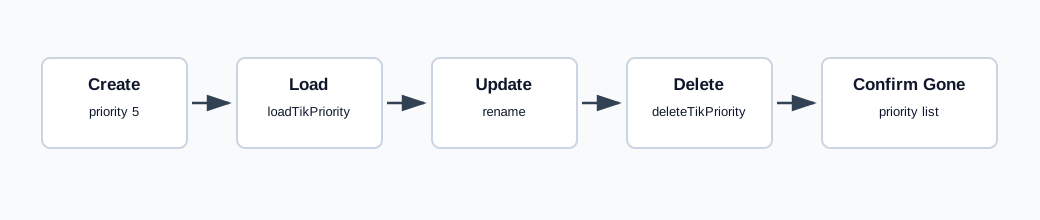
Create and update both submit createUpdateTikPriority with the serialized priority form. The verified create used priority_name=AI pr 142035, priority_active=1, priority_style_fontweight=normal, and empty icon/color fields. It returned {"success":true,"id":5}.
Edit loads a row with loadTikPriority. The verified update used priority_id=5 and priority_name=AI pr edit 142035, returning {"success":true,"id":"5"}.
Delete
- Click the delete action on the priority row.
- Confirm the prompt.
Delete calls deleteTikPriority with id=5. The response returned {"success":true}. A final DT_Select_tickets_priorities call confirmed AI pr edit 142035 no longer existed.
Artifacts
raw/playwright/workflows/ticket-priorities-crud-20260519T142035Z.jsonraw/playwright/workflows/ticket-priorities-source-20260519T142000Z.txtassets/screenshots/ticket-priorities-crud-20260519T142035Z-01-priorities-list.pngassets/screenshots/ticket-priorities-crud-20260519T142035Z-02-priorities-after-delete.png