Evidence Summary
- Workflow run
ticket-spam-20260519T135411Z- Support check
ticket-spam-support-check-20260519T135411Z- Ticket id
187- Ticket number
SUP-2605-82913- Final state
- Spam action accepted; disposable ticket marked as trash after verification.
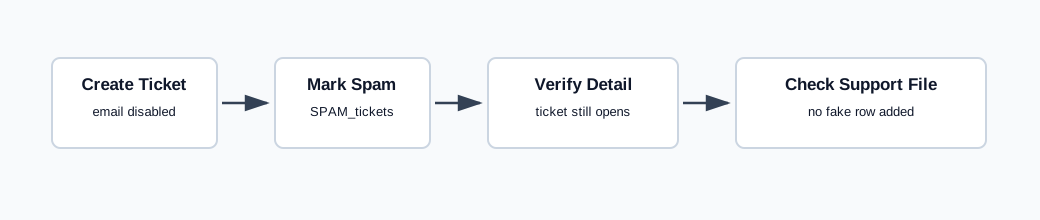
Use the List Action
- Open Tickets then Tickets.
- Select one or more ticket rows.
- Click Spam.
- Confirm the prompt.
The verified endpoint was tickets / SPAM_tickets, posted as list[]=187. The response returned {"success":true}.
Observed Result
After the spam action, ticket 187 still opened normally on the detail page and was not automatically marked as trash. The visible detail state remained subject AI Demo Ticket Spam 20260519T135411Z, status Aberto, owner Demo, department Suporte Tickets, topic Baixa, and priority Normal.
The SPAM support-file page at /tickets/apoio/spam was checked after the action. It showed No data available in table, so this controlled ticket with source other did not add the fake recipient aiticket@example.invalid to the SPAM support file.
Artifacts
raw/playwright/workflows/ticket-spam-20260519T135411Z.jsonraw/playwright/workflows/ticket-spam-support-check-20260519T135411Z.jsonassets/screenshots/ticket-spam-20260519T135411Z-01-new-ticket-form.pngassets/screenshots/ticket-spam-20260519T135411Z-02-detail-after-create.pngassets/screenshots/ticket-spam-20260519T135411Z-03-detail-after-spam.pngassets/screenshots/ticket-spam-20260519T135411Z-04-detail-after-trash.png