Evidence Summary
- Invoice view
/vendas/ft/view/OTk5OTAxNjk5- Source invoice
999901699 / FT 9999/1699- Menu path
- Communicate / Send email
- Composer modal
#sendEmail- Evidence file
raw/playwright/workflows/latest-sales-invoice-prepare-email.json
When to Use This
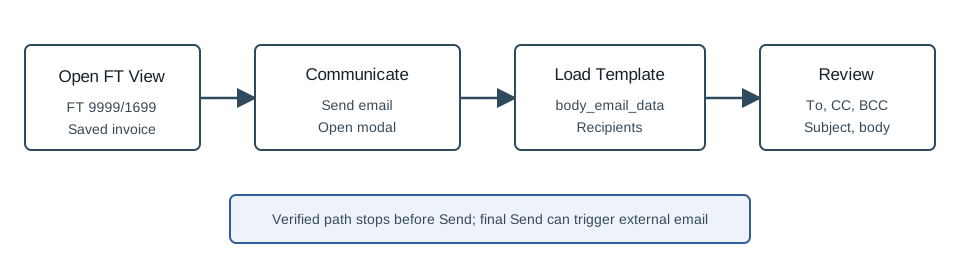
Use this when the user wants to email an already-issued invoice and needs to know what OfficeGest loads before the final send. The verified run intentionally stopped before clicking Send, because that can send an external email.
Step-by-Step
- Open Sales / Invoice [FT].
- Find the invoice in the list and open its view page. The verified run used
FT 9999/1699. - On the invoice view action bar, click Communicate.
- Choose Send email.
- Wait for the Send email modal to open.
- Review To, Language, CC, BCC, Subject, the email body, Other documents annexed, and Additional attachments.
- Only click Send after the recipient, subject, content, and attachments are correct.
What OfficeGest Loaded
| Area | Observed detail |
|---|---|
| Document binding | The modal hidden fields used tipoop=FT, num=999901699, tabela=Fact, tabelaEnt=clientes, namedoc=Invoice, and codterc=910. |
| Recipient options | The To, CC, and BCC selectors offered demo@example.com from the customer file and luis.santos@guisoft.net as collaborator. |
| Language | The language selector offered Portuguese, Spanish, and English; the verified modal defaulted to en. |
| Template data | body_email_data returned template cli_documentos. The Portuguese template subject was Envio de Documentos and the body referenced FT 9999/1699, total 3,69, and due date 20/05/2026. |
| Attachments | The modal included Other documents annexed and Additional attachments controls, including a file input named attach_email[]. |
Verified Behavior
| Check | Observed result |
|---|---|
| Menu availability | The saved FT view exposed Communicate with SMS, Whatsapp, Send email, and Copy document`s public link. |
| Email data request | Clicking Send email posted action=documents, option=body_email_data, num=999901699, tipoop=FT, codterc=910, and tipoterc=C. |
| Modal state | The #sendEmail modal was visible with title Send email and the expected document binding fields. |
| No send | The verified run did not submit any send-email request. It also did not send SMS or WhatsApp, create a document, change payment state, or change stock. |
Backend Calls Observed
| Action or endpoint | Purpose |
|---|---|
counters | Loads ticket counters attached to the invoice view. |
listaTabDocumento | Loads the saved invoice line data shown on the view. |
create_document&option=calcular_totais | Recalculates view totals for the existing FT. |
documents&option=body_email_data | Loads the email template, document context, and email body data for the invoice. |
Raw evidence: raw/playwright/workflows/sales-invoice-prepare-email-20260519T213657Z.json. Screenshots: assets/screenshots/sales-invoice-prepare-email-20260519T213657Z-01-saved-invoice-view.png and assets/screenshots/sales-invoice-prepare-email-20260519T213657Z-02-send-email-modal.png.