Evidence Summary
- Invoice view
/vendas/ft/view/OTk5OTAxNjk5- Source invoice
999901699 / FT 9999/1699- Menu path
- Print / PDF
- Generated file
FT 9999-1699.pdf- Evidence file
raw/playwright/workflows/latest-sales-invoice-print-pdf.json
When to Use This
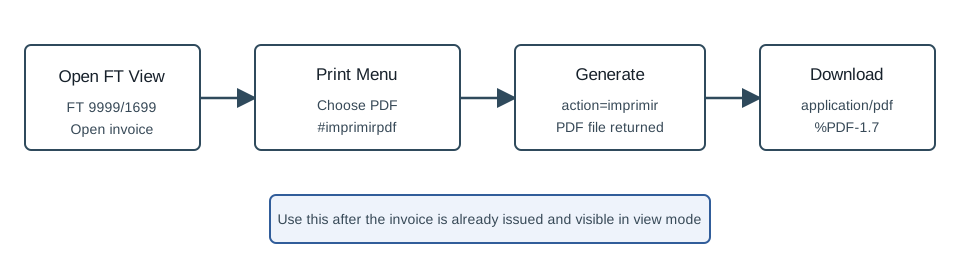
Use this after an invoice is already issued and visible in view mode. It is the right path when the user asks how to download, open, print, or save the PDF copy of a sales invoice.
Step-by-Step
- Open Sales / Invoice [FT].
- Find the invoice in the list and open its view page. The verified run used
FT 9999/1699. - On the invoice view action bar, click Print.
- Choose PDF. The menu item has id
imprimirpdfin the page. - Wait while OfficeGest generates the document. The observed backend call was
action=imprimir. - When the PDF opens or downloads, confirm the filename matches the invoice number. The verified file was
FT 9999-1699.pdf.
Other Output Choices in the Same Menu
| Menu item | Use it for |
|---|---|
| PDF Original | Generate the original archived PDF variant. |
| Generate the normal PDF copy. This is the verified path. | |
| PDF Signed | Generate the signed PDF variant. |
| Printer | Send the generated document into the browser print flow. |
| Print Talo | Generate the receipt-ticket style output. |
| Offer | Generate an offer/pricing-hidden variant. |
| Electronic Invoicing | Generate the electronic invoicing output. |
| E. Invoicing Assinado | Generate the signed electronic invoicing output. |
| Excel | Generate an Excel output. |
The invoice view also has a Communicate menu with SMS, Whatsapp, Send email, and Copy document`s public link. Those send/link actions are separate workflows from PDF generation.
Verified Behavior
| Check | Observed result |
|---|---|
| Print menu availability | The saved FT view exposed dropdown_btn_imprimir with PDF Original, PDF, PDF Signed, Printer, Print Talo, Offer, electronic invoicing choices, and Excel. |
| PDF generation call | OfficeGest posted action=imprimir, num=999901699, tipoop=FT, oficinas=T, impressao=F, talao=F, givearchive=F, and sign_doc=false. |
| Generation response | The response was {"success":true,"file":"FT 9999-1699.pdf"}. |
| Download route | OfficeGest built /download/?docfl=... from the returned file name. |
| PDF verification | The download returned status 200, content type application/pdf, 25990 bytes, and a %PDF-1.7 file header. |
Backend Calls Observed
| Action or endpoint | Purpose |
|---|---|
counters | Loads ticket counters attached to the invoice view. |
listaTabDocumento | Loads the saved invoice line data shown on the view. |
create_document&option=calcular_totais | Recalculates view totals for the existing FT. |
imprimir | Generates the PDF file for the selected invoice. |
/download/?docfl=... | Downloads the generated PDF file. |
Raw evidence: raw/playwright/workflows/sales-invoice-print-pdf-20260519T212449Z.json. Screenshots: assets/screenshots/sales-invoice-print-pdf-20260519T212449Z-01-saved-invoice-view.png and assets/screenshots/sales-invoice-print-pdf-20260519T212449Z-02-after-pdf-generation.png.