Evidence Summary
- Workflow run
ticket-resend-20260519T141001Z- Ticket id
191/SUP-2605-72300- Failed post id
219- Final state
- Resend attempted and failed with SMTP connection error; disposable ticket marked as trash.
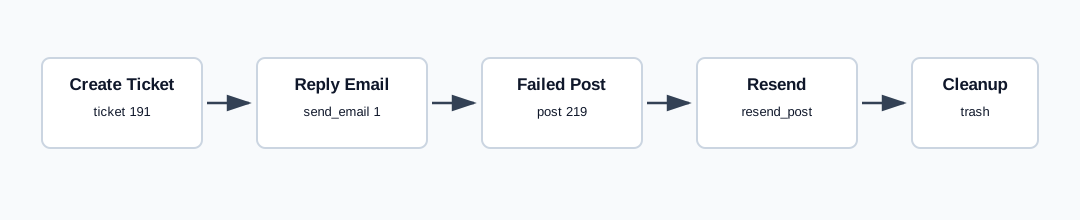
Create a Failed Email
Failed outbound messages display This message failed to send email on the ticket detail page and expose a resend control on the failed post. The controlled run created ticket 191, then posted a reply with send_email=1 to the ticket's invalid test recipient. The reply endpoint still returned {"succeeded":true,"message":{"data":"true"}}, and the detail page showed failed post 219.
Resend the Failed Post
- Open the ticket detail page.
- Find a post that shows
This message failed to send email. - Click the resend-error control on that post.
The verified endpoint was tickets / resend_post with post_id=219 and ticket_id=191. The resend response returned {"success":false,"smtp_sent":0,"smtp_date":"2026-05-19 15:10:23","smtp_error":"SMTP connect() failed.","message":"SMTP connect() failed."}.
Artifacts
raw/playwright/workflows/ticket-resend-20260519T141001Z.jsonassets/screenshots/ticket-resend-20260519T141001Z-01-detail-after-create.pngassets/screenshots/ticket-resend-20260519T141001Z-02-detail-after-failed-reply.pngassets/screenshots/ticket-resend-20260519T141001Z-03-detail-after-resend.pngassets/screenshots/ticket-resend-20260519T141001Z-04-detail-after-trash.png