Evidence Summary
- Create route
/vendas/ft/create- Final view
/vendas/ft/view/OTk5OTAxNjg3- Created invoice
999901687 / FT 9999/1687- Customer
[910] 100 Ouvidos Lda- Delivery method
CodModoExp=NV, vehicleAI-VAN-2026- Evidence file
raw/playwright/workflows/latest-sales-invoice-delivery-method.json
When to Use This
Use delivery details when the invoice should carry transport information such as the shipping method, vehicle, loading address, unloading address, dates, and times. This is separate from billing address and document-line warehouse selection.
Step-by-Step
- Open Sales / Invoice [FT], then click New document, or navigate directly to
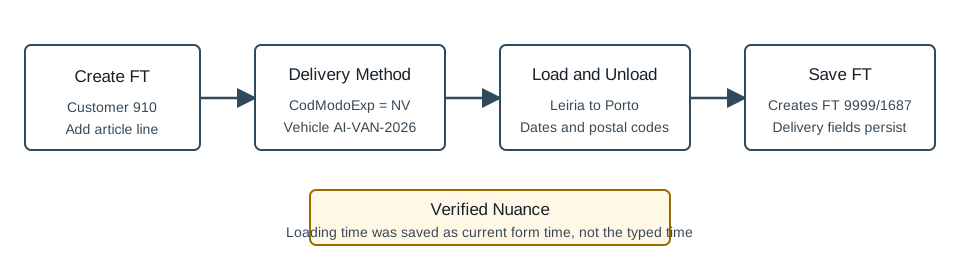
/vendas/ft/create. - Select the customer and confirm the mandatory invoice fields. The verified run used customer
910, seller1, and employee1. - Open the Delivery Method area and choose the shipping method. The field is
#doc_CodModoExp; the verified run selectedNV/ Nossa Viatura. - Enter the vehicle in
#doc_Viatura. The verified value wasAI-VAN-2026. - Fill the loading fields:
#doc_CargaMorada,#doc_CargaLocalidade,#doc_CargaCodPostal,#doc_CargaCodPais,#doc_CargaData, and#doc_CargaTime. - Fill the unloading fields:
#doc_DescargaMorada,#doc_DescargaLocalidade,#doc_DescargaCodPostal,#doc_DescargaCodPais,#doc_DescargaData, and#doc_DescargaTime. - Add at least one document line. The verified run inserted article
AI-DEMO-20260519-021105, quantity1, warehouse1. - Click Save and Finish, then confirm the Are you sure? dialog.
- Verify the saved invoice view still shows the delivery method, vehicle, loading address, and unloading address.
Delivery Methods Observed
| Code | Label |
|---|---|
NV | Nossa Viatura |
TRA | Transportadora |
VV | Viatura do Cliente |
Verified Behavior
| Check | Observed result |
|---|---|
| Default | The create form started with no delivery method selected, blank vehicle, loading address Leiria, and blank unloading address. |
| Before save | The form held CodModoExp=NV, vehicle AI-VAN-2026, loading address Armazem OfficeGest Leiria, and unloading address Rua Entrega OfficeGest 456. |
| Final save payload | The nested saveDocument payload included CodModoExp=NV, Viatura=AI-VAN-2026, loading fields, and unloading fields. |
| Time nuance | The loading time was typed as 10:30 before save, but the payload and final view used 21:14, the current form time in the verified run. The unloading time 15:45 persisted as entered. |
| Final view | The saved FT view retained NV, AI-VAN-2026, loading address/locality/postal code/country/date, and unloading address/locality/postal code/country/date/time. |
| List state | The FT list returned FT 9999/1687 as ABR / Open with total and pending value 1.97. |
Backend Calls Observed
| Action or endpoint | Purpose |
|---|---|
NameEntidades | Loads customer billing and unloading defaults after customer selection. |
loadArtigoReducido / insertLinhaTabDoc | Loads and inserts the invoice article line. |
saveDocument | Saves the final FT invoice with delivery-method, loading, and unloading fields. |
DT_List_Documentos | Verifies the invoice list row after save. |
Raw evidence: raw/playwright/workflows/sales-invoice-delivery-method-20260519T200919Z.json. Screenshots: assets/screenshots/sales-invoice-delivery-method-20260519T200919Z-01-create-page.png through assets/screenshots/sales-invoice-delivery-method-20260519T200919Z-03-final-view.png.