Evidence Summary
- Create route
/vendas/ft/create- Final view
/vendas/ft/view/OTk5OTAxNjg0- Created invoice
999901684 / FT 9999/1684- Customer
[910] 100 Ouvidos Lda- Fiscal zone field
#doc_zonafiscal/zonafiscal- Evidence file
raw/playwright/workflows/latest-sales-invoice-fiscal-zone.json
When to Use This
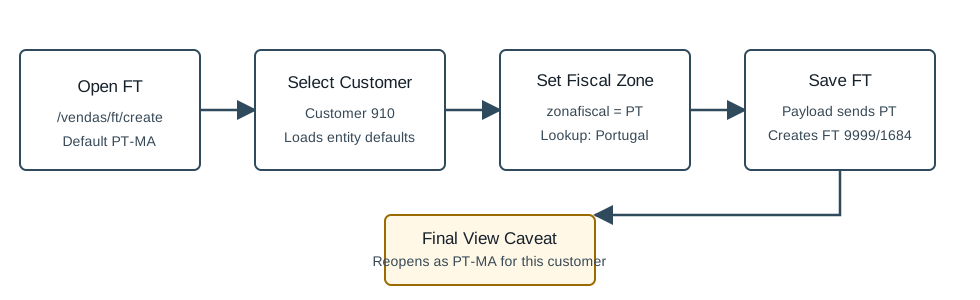
Use this check when tax treatment depends on geography, such as mainland Portugal, Madeira, or the Azores. In the demo, the fiscal-zone field can be changed before saving, but customer defaults may restore the saved document to the customer's configured fiscal zone.
Step-by-Step
- Open Sales / Invoice [FT], then click New document, or navigate directly to
/vendas/ft/create. - Select the customer. The verified run used
[910] 100 Ouvidos Lda. - Open the invoice details area and locate the fiscal-zone selector. The field is
#doc_zonafiscal. - Check the current value. The verified blank FT started with
PT-MA, Madeira. - If needed, search and select a different fiscal zone. The verified lookup
Sel2_Select_ZonasFiscaisreturnedPT/ Portugal. - Complete the invoice header, add at least one document line, and click Save and Finish.
- Reopen or review the saved invoice view and confirm the final value. In the verified run, OfficeGest restored the saved FT view to
PT-MA.
Fiscal Zones Observed
| Code | Label |
|---|---|
PT | Portugal |
PT-AC | Açores |
PT-MA | Madeira |
ES | Espanha |
Verified Behavior
| Check | Observed result |
|---|---|
| Default on FT create | #doc_zonafiscal=PT-MA. |
| Lookup | Sel2_Select_ZonasFiscais with term PT returned PT / Portugal. |
| Before save | The form held #doc_zonafiscal=PT. |
| Final save payload | The nested saveDocument form payload submitted zonafiscal=PT. |
| Final view caveat | The saved FT view displayed #doc_zonafiscal=PT-MA, so this customer's fiscal zone appears to be restored after save. |
| List state | The FT list returned FT 9999/1684 as ABR / Open, total 1.97, pending 1.97. |
Backend Calls Observed
| Action or endpoint | Purpose |
|---|---|
Sel2_Select_ZonasFiscais | Searches fiscal-zone selector values such as PT, PT-AC, and PT-MA. |
NameEntidades | Loads customer details after selecting the invoice billing entity. |
loadArtigoReducido / insertLinhaTabDoc | Loads and inserts the invoice article line. |
saveDocument | Saves the final FT invoice; the verified request sent zonafiscal=PT. |
DT_List_Documentos | Verifies the invoice list row after save. |
Raw evidence: raw/playwright/workflows/sales-invoice-fiscal-zone-20260519T195158Z.json. Screenshots: assets/screenshots/sales-invoice-fiscal-zone-20260519T195158Z-01-create-page.png through assets/screenshots/sales-invoice-fiscal-zone-20260519T195158Z-04-final-view.png.