Evidence Summary
- Create route
/vendas/ft/create- Final view
/vendas/ft/view/OTk5OTAxNjkx- Created invoice
999901691 / FT 9999/1691- Customer
[910] 100 Ouvidos Lda- Line accounting classification
1/[1] Mercadorias- Evidence file
raw/playwright/workflows/latest-sales-invoice-line-accounting-classification.json
When to Use This
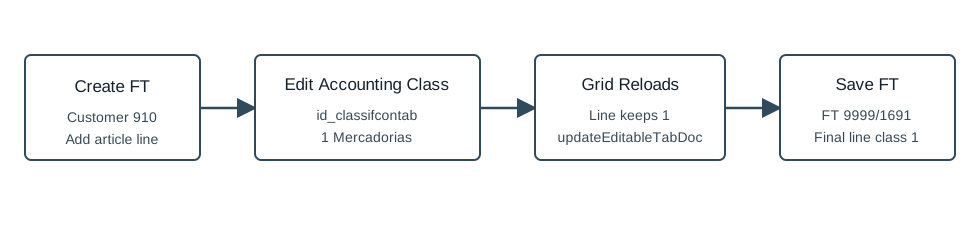
Use a line accounting classification when a specific invoice line must be assigned to an accounting class such as goods, subcontracts, specialized services, advertising, or other expense/revenue categories. This is a line-level field and is separate from both invoice header classification and line cost center.
Step-by-Step
- Open Sales / Invoice [FT], then click New document, or navigate directly to
/vendas/ft/create. - Select the customer and confirm the mandatory invoice fields. The verified run used customer
910, seller1, and employee1. - Add the article line. The verified run inserted article
AI-DEMO-20260519-021105, quantity1, warehouse1. - In the document lines table, edit the accounting classification column for the line. The stored line field is
id_classifcontab. - Select the accounting classification. The verified run selected
1/ Mercadorias. - Wait for the document-line grid to reload and confirm the line now holds
id_classifcontab=1. - Click Save and Finish, then confirm the Are you sure? dialog.
- Verify the saved invoice view still shows the accounting classification on the document line.
Observed Accounting Classifications
| Code | Label |
|---|---|
1 | Mercadorias |
2 | Subcontratos |
3 | 6221 - Trabalhos Especializados |
6 | 6222 - Publicidade e Propaganda |
7 | 6223 - Vigilância e segurança |
8 | 6224 - Honorários |
9 | 6225 - Comissões |
10 | 6226 - Conservação e Reparação |
11 | 6227 - Serviços bancários e financeiros |
12 | 6228 - Outros Serviços Especializados |
Verified Behavior
| Check | Observed result |
|---|---|
| Before edit | The inserted line had id_classifcontab=null. |
| Classification edit | updateEditableTabDoc returned {"success":true,"msg":""} for campo=id_classifcontab and value=1. |
| After grid reload | The line returned id_classifcontab=1. |
| Final view | The saved FT line retained id_classifcontab=1. |
| List state | The FT list returned FT 9999/1691 as ABR / Open with total and pending value 1.97. |
Backend Calls Observed
| Action or endpoint | Purpose |
|---|---|
NameEntidades | Loads customer billing data after customer selection. |
loadArtigoReducido / insertLinhaTabDoc | Loads and inserts the invoice article line. |
updateEditableTabDoc | Updates the line field id_classifcontab. |
DT_TabDocumento | Reloads the document-line grid after the accounting-classification edit. |
saveDocument | Saves the final FT invoice with the updated server-side line. |
DT_List_Documentos | Verifies the invoice list row after save. |
Raw evidence: raw/playwright/workflows/sales-invoice-line-accounting-classification-20260519T202853Z.json. Screenshots: assets/screenshots/sales-invoice-line-accounting-classification-20260519T202853Z-01-create-page.png through assets/screenshots/sales-invoice-line-accounting-classification-20260519T202853Z-04-final-view.png.