Evidence Summary
- Create route
/vendas/ft/create- Final view
/vendas/ft/view/OTk5OTAxNjkz- Created invoice
999901693 / FT 9999/1693- Customer
[910] 100 Ouvidos Lda- VAT change
23to13- Evidence file
raw/playwright/workflows/latest-sales-invoice-line-vat.json
When to Use This
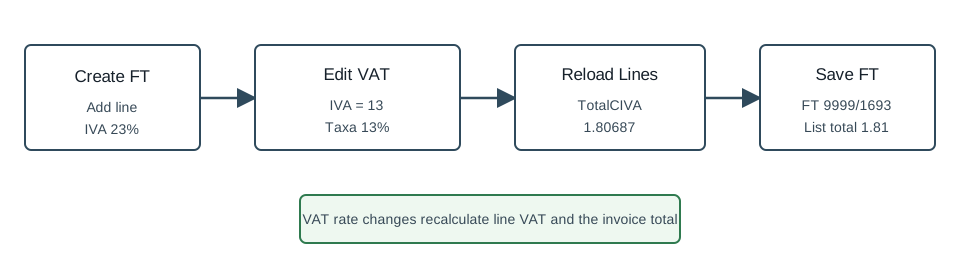
Use a line VAT change when a specific product or service line needs a tax rate different from the article's default. This is a line-level edit; review the fiscal zone and customer tax context before saving because the VAT rate directly recalculates the invoice total.
Step-by-Step
- Open Sales / Invoice [FT], then click New document, or navigate directly to
/vendas/ft/create. - Select the customer and confirm the mandatory invoice fields. The verified run used customer
910, seller1, and employee1. - Add the article line. The verified run inserted article
AI-DEMO-20260519-021105, quantity1, warehouse1. - In the document lines table, edit the VAT column for the line. The stored line field is
IVA. - Select the target VAT rate. The verified run selected
13, available as Reduzida 1 and Taxa 13% in the VAT lookup. - Wait for the document-line grid to reload and confirm the line now holds
IVA=13. - Check the recalculated line total. In the verified run the total with VAT changed from
1.96677to1.80687. - Click Save and Finish, then confirm Are you sure?.
- Verify the saved invoice view still shows
IVA=13on the document line. - Verify the FT list total. The verified invoice list row displayed total and pending value
1.81.
Observed VAT Lookup
| Lookup value | Label | Rate |
|---|---|---|
13 | Reduzida 1 | 13 |
13 | Taxa 13% | 13 |
The lookup used Sel2_Select_v2 against table ivas with columns codiva, designacao, tipotaxa, and iva. Other rates may appear depending on fiscal configuration and search term.
Verified Behavior
| Check | Observed result |
|---|---|
| Before edit | The inserted line had IVA=23 and TotalCIVA=1.96677. |
| VAT edit | updateEditableTabDoc returned {"success":true,"msg":""} for campo=IVA and value=13. |
| After grid reload | The line returned IVA=13 and TotalCIVA=1.80687. |
| Final view | The saved FT line retained IVA=13, ValorIVA=0.20787, and TotalCIVA=1.80687. |
| List state | The FT list returned FT 9999/1693 as ABR / Open with total and pending value 1.81. |
Backend Calls Observed
| Action or endpoint | Purpose |
|---|---|
Sel2_Select_v2 | Looks up VAT rates from table ivas. |
NameEntidades | Loads customer billing data after customer selection. |
loadArtigoReducido / insertLinhaTabDoc | Loads and inserts the invoice article line. |
updateEditableTabDoc | Updates the line field IVA. |
DT_TabDocumento | Reloads the document-line grid after the VAT edit. |
saveDocument | Saves the final FT invoice after confirmation. |
DT_List_Documentos | Verifies the invoice list row after save. |
Raw evidence: raw/playwright/workflows/sales-invoice-line-vat-20260519T204152Z.json. Screenshots: assets/screenshots/sales-invoice-line-vat-20260519T204152Z-01-create-page.png through assets/screenshots/sales-invoice-line-vat-20260519T204152Z-04-final-view.png.