Evidence Summary
- Create route
/vendas/ft/create- Final view
/vendas/ft/view/OTk5OTAxNjgx- Created invoice
999901681 / FT 9999/1681- Customer
[910] 100 Ouvidos Lda- Payment condition
[30] 30 Dias, due date18/06/2026- Evidence file
raw/playwright/workflows/latest-sales-invoice-payment-terms.json
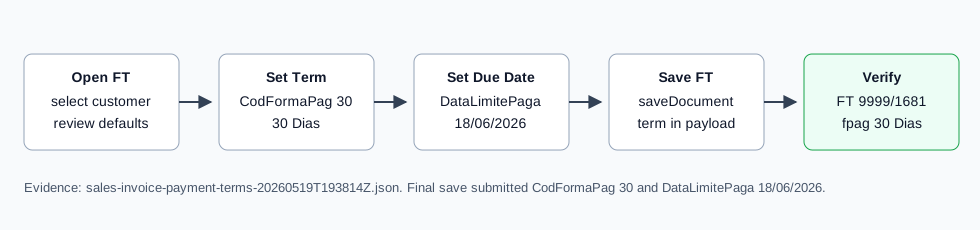
When to Use This
Use payment terms when the FT should remain unpaid but carry a specific payment deadline, such as 10, 30, 45, 60, or 90 days. This differs from an Invoice / Receipt [FR], which requires payment before final save.
Step-by-Step
- Open Sales / Invoice [FT], then click New document, or navigate directly to
/vendas/ft/create. - Select the customer and confirm billing fields. The verified run used customer
910, VAT509031862. - Open the invoice details area and locate Payment condition / Payment Deadline. The field is
#doc_CodFormaPag. - Choose the payment condition. The verified run selected [30] 30 Dias, stored as
CodFormaPag=30. - Confirm the days helper field. The verified
#doc_CodFormaPag_diasvalue was30. - Confirm or adjust the due date. The verified due-date field
#doc_CodFormaPag_datawas18/06/2026. - Complete the invoice header, including seller, employee, and reference if needed.
- Add at least one document line. The verified run inserted article
AI-DEMO-20260519-021105, quantity1, warehouse1. - Click Save and Finish, then confirm the Are you sure? dialog.
- Verify the final invoice view still shows the chosen payment condition and due date.
Available Terms Observed
| Code | Label | Days |
|---|---|---|
- | Livre | 0 |
10 | 10 Dias | 10 |
30 | 30 Dias | 30 |
45 | 45 Dias | 45 |
60 | 60 Dias | 60 |
90 | 90 Dias | 90 |
PA | Pagamento Antecipado | 0 |
PP | Pronto Pagamento | 1 |
Verified Behavior
| Check | Observed result |
|---|---|
| Default | The blank FT started with PP, days 1, and due date 20/5/2026. |
| Changed term | The verified invoice used CodFormaPag=30, days 30, due date 18/06/2026. |
| Final save payload | The nested saveDocument form payload submitted CodFormaPag=30 and DataLimitePaga=18/06/2026. |
| Final view | The final invoice view retained #doc_CodFormaPag=30 and #doc_CodFormaPag_data=18/06/2026. |
| List state | The FT list showed FT 9999/1681 as ABR / Open with fpag: 30 Dias. |
Backend Calls Observed
| Action or endpoint | Purpose |
|---|---|
NameEntidades | Loads customer billing data after customer selection. |
loadArtigoReducido / insertLinhaTabDoc | Loads and inserts the invoice article line. The line insert also included the selected formapag=30. |
saveDocument | Saves the final FT invoice with the selected payment term and due date. |
DT_List_Documentos | Verifies the invoice list row after save. |
Raw evidence: raw/playwright/workflows/sales-invoice-payment-terms-20260519T193814Z.json. Screenshots: assets/screenshots/sales-invoice-payment-terms-20260519T193814Z-01-create-page.png through assets/screenshots/sales-invoice-payment-terms-20260519T193814Z-03-final-view.png.