Evidence Summary
- Workflow run
ticket-detail-updates-20260519T132757Z- Ticket id / number
180/SUP-2605-84872- Subject
AI Demo Ticket Detail Updates 20260519T132757Z- Final detail state
- Status
Espera, priorityAlta, topicManutenção Corretiva, ownerDavidetete Batanete Roberto.
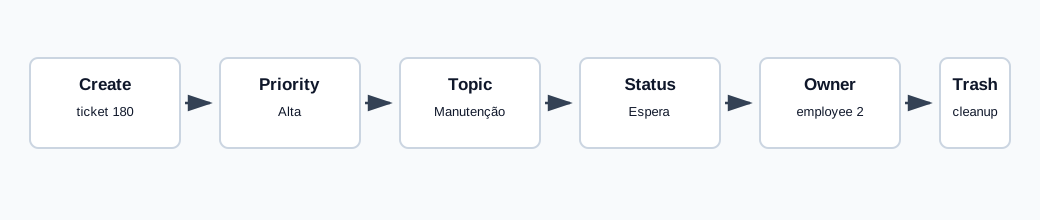
Update Priority
- Open a ticket detail page.
- Click the priority control in the ticket summary panel.
- Select the new priority.
The verified priority update used tickets / UPDATE_ticket with data[id]=180 and data[prio_id]=3. The response returned priority name Alta.
Update Topic and Status
Topic and status use the same update endpoint. The verified topic update used data[topic_id]=2 and returned Manutenção Corretiva. The verified status update used data[status_id]=4 and returned Espera.
Update Owner
The owner selector filters active collaborators and department users. The verified owner update used data[assign_id]=2. The response returned owner Davidetete Batanete Roberto, and the detail reload preserved view_alter_assign_id=2.
Verify After Reload
After all updates, reloading /tickets/tickets/view/MTgw showed priority Alta, topic Manutenção Corretiva, status Espera, and owner Davidetete Batanete Roberto. The hidden/select values were prio_id=3, topic_id=2, status_id=4, and assign_id=2.
Artifacts
raw/playwright/workflows/ticket-detail-updates-20260519T132757Z.jsonassets/screenshots/ticket-detail-updates-20260519T132757Z-01-detail-after-create.pngassets/screenshots/ticket-detail-updates-20260519T132757Z-02-detail-after-updates.pngassets/screenshots/ticket-detail-updates-20260519T132757Z-03-detail-after-trash.png