Evidence Summary
- Route
/vendas/faturacaolote- Page title
OG - Batch Billing- Probe file
raw/playwright/vendas-faturacaolote-interaction-probe.json- Screenshot
assets/screenshots/probe-vendas-faturacaolote-interaction-after-filter.png
When to Use This
Use Batch Billing when eligible sales documents should be converted into invoices in bulk and optionally sent by email. This is a high-impact utility because the final action can create invoices and trigger email delivery.
Step-by-Step
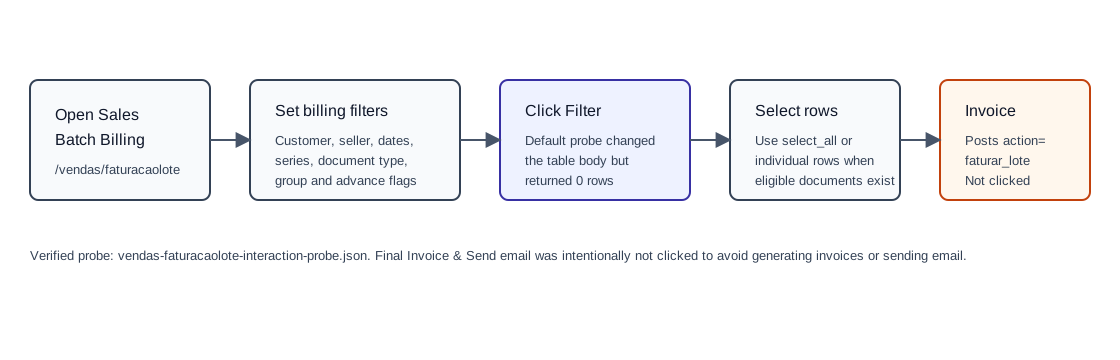
- Open Sales / Batch Billing, or navigate directly to
/vendas/faturacaolote. - Set Customers and Sellers if the batch should target a specific customer or salesperson.
- Set the date range using Since and to.
- Choose Serial Num and Document Type so OfficeGest knows which eligible source documents to invoice.
- Use Group the documents in one file if selected documents should be grouped into one generated file.
- Use Nao processar clientes com adiantamentos em aberto to skip customers with open advances.
- Click Filter to populate the batch table.
- Review the table columns NUM., DATE, CUSTOMER, and TOTAL.
- Select individual rows or use select_all.
- Click Invoice & Send email only after confirming the selected documents and series. The page includes a required series modal field
serieDocand a Save button for that modal.
Verified Filter Result
| Observed value | Detail |
|---|---|
| Default result | The verified default filter changed the table body but returned No data available in table. |
| Button state | The action button stayed Invoice & Send email(0). |
| Main controls | cliente, vendedor, dataini, datafim, NSerie, tipoDoc, agrupar, nao_processar_adiant, select_all, and table search fields. |
| Series modal | Hidden form form_serie contains required select serieDoc; modal buttons are modal_serie_buttonClose and modal_serie_buttonSave. |
Backend Calls Observed
| Action or endpoint | Purpose |
|---|---|
get_home_news and notifications option=get_new_notifications | Background page-load calls captured during the probe. |
faturar_lote | Configured by page script for the final batch billing operation. The observed logic sends selected document ids as docs, document operation as tipoop, grouping flag agrupar, and the selected target series serieDoc. It presents a Bootbox Are you sure? confirmation. This action was not executed in the probe. |
Validation Notes
- Because the default probe found no rows, this page still needs a controlled run with eligible source documents before the final invoice-generation payload can be fully verified.
- The final button label includes the selected count. If the label still shows (0), no documents are selected for billing.
- Use extra caution with the final action: it is expected to create invoices and send email, unlike the read-only Filter action.