Evidence Summary
- Route
/vendas/impreslote- Page title
OG - Lot Printing- Probe file
raw/playwright/vendas-impreslote-interaction-probe.json- Screenshot
assets/screenshots/probe-vendas-impreslote-interaction-after-filter.png
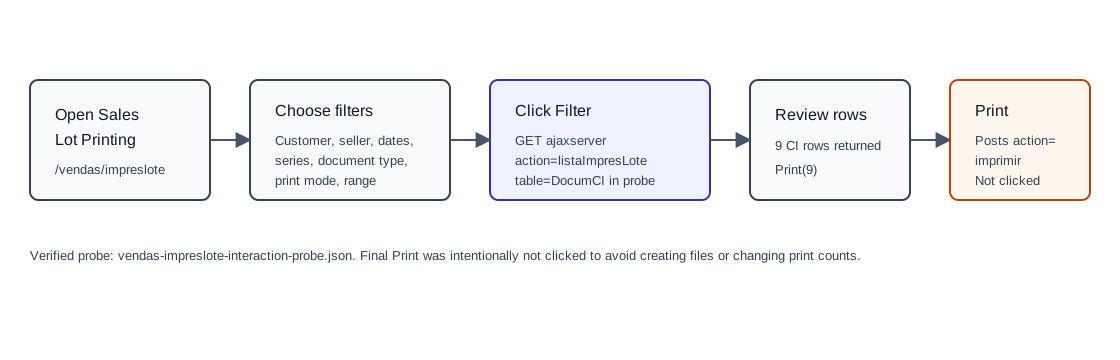
When to Use This
Use Lot Printing when you need to find a batch of existing sales documents and print them together, optionally grouped into a single file. The page is a printing utility, not a document creation page.
Step-by-Step
- Open Sales / Lot Printing, or navigate directly to
/vendas/impreslote. - Use Customers and Sellers to narrow the document owner context, or leave them at All.
- Choose whether the date range filters by Date or Data Reg.. The observed default was Date.
- Set Since and to date/time values if the batch should be limited. The observed default time range was
00:00to23:59. - Choose Serial Num if a specific document series is required. The observed hidden value was
NSerie=nullwhen all series were selected. - Choose Document Type. The observed default was [CI] Invoice with hidden value
tipoDoc=CIand backend tableDocumCI. - Choose the Print mode. The observed default was Standard with
tipo_impressao=-1. - Optionally set Initial and End document-number bounds.
- Keep or clear Group the documents in one file. The observed default was checked with value
T. - Click Filter. The verified probe called
GET /ajaxserver?action=listaImpresLote. - Review the resulting table. Columns observed were NUM., DATE, CUSTOMER, NUMBER OF PRINTS, and TOTAL.
- Select individual rows or use select_all, then click Print only when the batch is correct.
Verified Filter Result
| Observed value | Detail |
|---|---|
| Rows returned | 9; button changed from Print(0) to Print(9). |
| Backend call | action=listaImpresLote, date_filter_type=date, date_time_ini=00:00, date_time_fim=23:59, nserie=null, table=DocumCI, compras=F, filtrar=T. |
| Example rows | CI 9999/1, CI 9999/2, CI 9999/3, CI 9999/4, CI 9999/5, CI 9999/6, CI 9999/7, CI 9999/8, and CI 9999/9. |
| Demo-created row | CI 9999/9, dated 19/05/2026, customer [910] 100 Ouvidos Lda, number of prints 0, total 1,97. |
Backend Calls Observed
| Action or endpoint | Purpose |
|---|---|
listaImpresLote | Loads the print-batch table using filters for date type, date range, seller, customer, series, document table, initial/final range, and sales/purchases context. |
imprimir | Configured by page script for the final print operation. The observed logic posts num, tipoop, oficinas=F, impressao=F, agrupar, selected documents as docsagrup, tipo_impressao, and em_lote=T. This action was not executed in the probe. |
Validation Notes
- The final print button can affect print metadata. In the verified probe the row
CI 9999/9had print count0, so a live print test may change visible counts. - The page defaults to CI documents, but the document-type selector is the controlling UI for other sales document batches.
- Use the table search fields
search_num,search_Data,search_Nome,search_nvias, andsearch_Totalafter filtering when the batch is large.