Evidence Summary
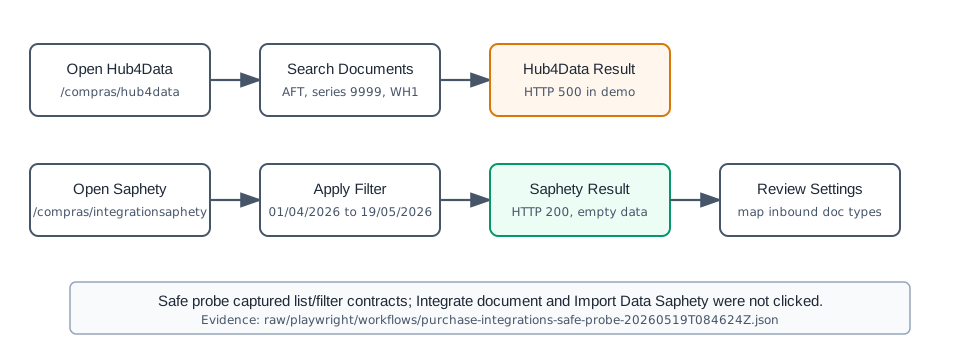
- Hub4Data route
/compras/hub4data- Saphety route
/compras/integrationsaphety- Workflow run
purchase-integrations-safe-probe-20260519T084624Z- Evidence file
raw/playwright/workflows/latest-purchase-integrations-safe-probe.json
When to Use This
Use Purchases / Hub4Data to search supplier documents available from Hub4Data before integrating them into OfficeGest. Use Purchases / Integration Saphety to filter inbound Saphety records, review status, map Saphety document types to OfficeGest purchase document types, and manage selected records.
Hub4Data Steps
- Open Purchases / Hub4Data, or navigate directly to
/compras/hub4data. - Use the main list to review supplier documents returned by the integration. Expected columns are Supplier, Document Type, Document, Date, Date Due, Total N/ VAT, VAT Value, and Total.
- Click Search to open the find-documents modal.
- Fill or review Supplier, Document number, Date, Document Type, Serie, and Warehouse. The verified defaults included
tipoop=AFT, series9999, and warehouse1. - Keep Only not integrated enabled when you only want pending integration records.
- Click the modal Search button to refresh the integration list.
- Only use Integrate document after selecting and reviewing an external document. The safe probe did not click this button.
Demo limitation observed: the verified document-list call returned HTTP 500 with message Ocorreu um erro interno no servidor., so no Hub4Data document could be integrated in the demo run.
Saphety Steps
- Open Purchases / Integration Saphety, or navigate directly to
/compras/integrationsaphety. - Use Filters to set the date range. The safe probe used
01/04/2026through19/05/2026. - Click Filter. The verified request was
saphetyinbound&option=dtwithlistar=1. - Review the records table. Expected columns include Num Contrib., Sender, Document Type, Nm.Doc., Date, Total Value, Status, and Doc. N..
- Use the document-type and integration-status filters to narrow records. Observed status filters include All, Not Sent, Sent, Accepted, Rejected, and Payed.
- Use the Settings tab to map Saphety document types to OfficeGest purchase document types. Observed mappings can target AFT, CD, PEC, EF, FAF, FRF, FSF, GCF, GRF, GTF, NCF, NDF, NVF, REF, RF, and VDF.
- Use With selected actions only after rows are selected and reviewed. The safe probe saw a Reject option and a rejection reason modal but did not submit it.
- Use Import Data Saphety only when you intend to import from Saphety. The safe probe captured the button but did not click it because it likely triggers an external import action.
The verified Saphety list request returned HTTP 200 with {"draw":0,"recordsTotal":0,"recordsFiltered":0,"data":[]}, so the demo had no inbound records in the tested date range.
Backend Calls Observed
| Integration | Action or endpoint | Observed result |
|---|---|---|
| Hub4Data | hub4data&option=documents | Called with from_date=19/04/2026, to_date=19/05/2026, and integrated=0. Demo response was HTTP 500 with JSON message Ocorreu um erro interno no servidor.. |
| Hub4Data | Sel2_Select_v2 | Initializes warehouse selector from lojas and series selector from seriesdoc. |
| Saphety | saphetyinbound&option=dt | Called with dataini=01/04/2026, datafim=19/05/2026, and listar=1. Demo response was HTTP 200 with an empty DataTables payload. |
Validation Notes
- Hub4Data could not be validated beyond the page, controls, and failing document-list endpoint because the demo server returned HTTP
500. - Saphety list/filter behavior was validated, but no records were present and no import/reject/send action was executed.
- Integration buttons can contact external services or change document state. Review the selected rows and the configured mapping before using them in a live company.